3CX API - Creation of Ring Groups with DID and Department assignment

Bond21

Bronze Partner
Basic Certified
Joined
Nov 30, 2021
Messages
23
Reaction score
4
Hello there,

We will be configuring a Multi Tenant instance and we have setup the API access already and got some test data inputted. In looking in the API endpoint documentation I cannot see how to create Ring groups with assignment of DIDs and Departments. From the response using the Firefox web dev tool manually entering via the web was as follows:

Any help appreciated thanks!
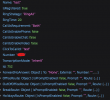
1741370202634.png
 
Hi @Bond21

Firefox developer tools are a good place to start, as they show you what is really needed.

We often use powershell for the xapi of a 3CX. Here is a very simple example of creating a new ring group:
Code:
# set vars
$tcxurl="mypbx.mydomain.de"     # needs port if not 443
$jsonauthbody = (@{
    Username="988"              # 3CX user, maybe email address
    Password="Super_Secret0815" # 3CX user password
    SecurityCode=""
} | ConvertTo-Json)

# get auth token
$LoginResponse = Invoke-RestMethod -Uri "https://$tcxurl/webclient/api/Login/GetAccessToken" -Body $jsonauthbody -Method POST -ContentType "application/json"
$headers = @{Authorization = "Bearer $($LoginResponse.Token.access_token)"}

# get system default group id
$urisysid="https://$tcxurl/xapi/v1/Groups?`$filter=not startsWith(Name, '___FAVORITES___')&`$select=Id,IsDefault"
$sysgrpid=((Invoke-RestMethod -uri $urisysid -headers $headers -Method GET -ContentType "application/json").Value | where {$_.IsDefault -eq "True"}).Id

# get next possible rg number
$uri="https://$tcxurl/xapi/v1/RingGroups/Pbx.GetFirstAvailableRingGroupNumber()"
$rgnr=(Invoke-RestMethod -uri $uri -headers $headers -Method GET -ContentType "application/json").Number

# example: create new simple ring group
$postdata='{"Number":"'+$rgnr+'","Name":"'+$rgnr+'","RingStrategy":"RingAll","RingTime":20,"CallUsEnableChat":false,"ClickToCallId":"'+$rgnr+'","CallUsRequirement":"Both","ForwardNoAnswer":{"To":"None"},"OutOfOfficeRoute":{"Route":{"To":"ProceedWithNoExceptions"}},"BreakRoute":{"Route":{"To":"ProceedWithNoExceptions"}},"HolidaysRoute":{"Route":{"To":"ProceedWithNoExceptions"}},"Members":[],"GreetingFile":"","Groups":[{"GroupId":'+$sysgrpid+',"Rights":{"RoleName":"system"}}]}'
Invoke-RestMethod -uri "https://$tcxurl/xapi/v1/RingGroups" -headers $headers -Method POST -body $postdata -ContentType "application/json"

This creates a new ring group in the default department. You will certainly have to adjust this.

As well as the number assigned to the ring group. You will be able to ask for a possible free number. But you can certainly do this yourself ;)

I just hope I didn't mistype it.
 
Last edited:
Thank you - that was just what I needed, much appreciated! Have been using Powershell ourselves for the Department/User creation process so this fits in perfectly. :)
 
  • Like
Reactions: fxbastler

Latest Posts

Forum statistics

Threads
111,964
Messages
590,000
Members
164,869
Latest member
hpgitsupport