3CX app defaults to video on incoming call from Polycom VVX 501

Status
Not open for further replies.

Callinectes

Silver Partner
Joined
Nov 19, 2020
Messages
196
Reaction score
53
Is there a way to prevent internal calls that originate from Polycom VVX 501s to users using the Desktop App from defaulting to video calls? We have a customer complaining that these calls always try to use the camera and whether or not they accept the video call or cancel and go audio only the calls take a few seconds to connect after answering.
 
Hi, I'm afraid this is not possible. The callee when receiving the call can answer only in audio and not with video, so the callee will decide if the call is established with video or not.

There is not any other alternative for this.
 
Perhaps I wasn't clear in my description. This IS what is happening now. The calls from a user calling from a VVX501 to a user who is utilizing the Desktop App is having the call default to video and the answering user is having to cancel the attempt by the Desktop App to initiate video. The biggest problem here is the delay that this causes. PSTN calls to not initiate the video attempt and so are handled normally/as expected.
 
Hi Kevin,

Unfortunately the Polycom will always send video in the invite, even if your have the physical camera turned off.
There is no way to prevent the dialog box from popping up when you answer a call.

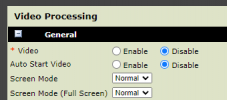
If your VVX phones are not all equipped with an actual camera, you can disable video from the web UI and it will stop sending the video request to 3CX.
1692709590228.png
 
Hi Kevin,

Unfortunately the Polycom will always send video in the invite, even if your have the physical camera turned off.
There is no way to prevent the dialog box from popping up when you answer a call.

If your VVX phones are not all equipped with an actual camera, you can disable video from the web UI and it will stop sending the video request to 3CX.
View attachment 36878
This problem has become a problem again. Is there a way to do this through a custom template? They are on v18.
 
Figured out the custom template settings to fix this. Any chance you could integrate this into provisioning with maybe a toggle switch which would add this fix or not, and make video not enabled by default since I doubt anyone uses the video functionality of the VVX 501 or 601?

Default Polycom VVX gen2 template video section (lines 935-943 of full template):
{IF ua=VVX_501,VVX_601}
<video
video.autoStartVideoTx="0">
<video.codecPref
video.codecPref.H263="2"
video.codecPref.H264="1"
/>
</video>
{ENDIF}

Custom template section that disables video:
{IF ua=VVX_501,VVX_601}
<video
video.enable="0"
video.autoStartVideoTx="0">
<video.codecPref
video.codecPref.H263="2"
video.codecPref.H264="1"
/>
</video>
{ENDIF}
 
Status
Not open for further replies.