3CX App for Android - Not showing contacts name in mobile's phonebook on incoming/outgoing call. But IOS can show.

Status
Not open for further replies.

Masaki

Titanium Partner
Advanced Certified
Joined
Mar 23, 2020
Messages
60
Reaction score
8
Hi 3CX Support & All,

Good afternoon, This is information detail about Support Problem Display contact name not show at 3CX App for Android.

OS : Windows Server 2019 STD >> Server on Cloud
3CX Version : 18.0.5.418
License : Ent 32 SC
Client : Smart Phone Android V.18.1.3.128 & IOS V.18.6.1.539
Network : LTE

Remark : No have Contact Phonebook at 3CX PBX. Why : All user work : sale and has Contact at Personal Mobile' Phone. *No contact at 3cx*
Test : Re-Install App between IOS Phone & Andriod Phone and register scan QR Code at same extension. Fix : allow all permission 3CX APP to connect Contact Personal Mobile's Phone.
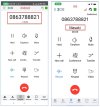
Member News Contact for Name : Masaki and Contact CID : 0863788821 (Test simulate) in two devices (IOS & Andriod)
Test call in/out to this Extension

Problems :

If call in has Noti-PUSH and ringing
Android Show : 0863788821
IOS Show : Masaki
*Make not know who call to.

If Answer call in
Android Show : Masaki
IOS Show : Masaki

If Keypad call Out Number 0863788821
Android Show : 0863788821
IOS Show : Masaki

What Solution to resolve this problems if user has 70% (about 80 User) use Android model.

Thank you,
Suebpong Sanegthongsuk
 
Hi @Masaki

Thanks for your feedback

Can you confirm that you have your android phone permissions to access the phone contacts?
You can confirm this by navigating to Contacts tab, and filter by 'Android'. Do you see any contacts displayed there?

Also could you provide me in PM the app's verbose logs in order to understand what's going on and help you out with your issue?
  1. Enable Verbose Logs: “Android App Settings (top left hamburger menu) > Settings > Advanced > Troubleshooting > Enable verbose logging”.
  2. Reproduce the issue by making a incoming call and “Send log report”: Android App Settings (top left hamburger menu) > Settings > Advanced > Troubleshooting > Send Log Report
Thanks
 
ThomB_3CX

Thanks for replay me.

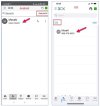
You can confirm this by navigating to Contacts tab, and filter by 'Android'. Do you see any contacts displayed there?
I confirm with this picture beetween IOS & Android.

I will test with my FQDN, Because waiting for data verbose logging from customers.
S__278364166.jpgmessageImage_1671550076558.jpg

Thanks.
 
Update

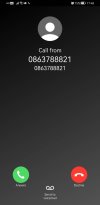
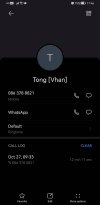
This is picture in first device android has problem income.
In device member contact Name : Tong[vhan] CID : 0863788821

not show name at noti if call in.
709430.jpg

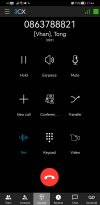
If Answer show display name.
709420.jpg

this contact member in this mobile.
709421.jpg

I will send verbose logging with PM to you.ThomB_3CX

Thanks.
 
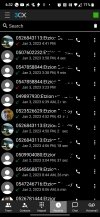
Same here. Android. These two images show the contact history. Note that the contacts image appear correctly, however - the only name appearing is my name, derived from the name of the extension (I did back out somewhat my last name).
Screenshot_20230103-183252_2.jpg
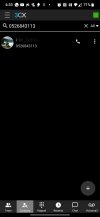
The other image shows the address book after looking for the phone number and getting a correct contact.
Screenshot_20230103-183323_2.jpg
 
@ThomB_3CX - I have end users complaining about the same thing (at least with Android). Is this a known bug? Happy to diagnose if you need.
 
Hi @techcare
Thanks for your feedback.
Yes please, we would appreciate logs for this issue to understand the problem.

Could you kindly install the Beta build and send us logs. Beta build contains some fixes and also extended logs which will help us diagnose this problem better

***
You'd have to join the BETA program to get this update. Just launch the Play Store, search for 3CX, and while in the Apps information page (where you see Uninstall & Open) scroll down to where it reads "Join the Beta" and press "Join".

It may take a few minutes but once complete you will see the Update button available for you to install the latest Beta app.
Current Beta build should be 18.1.3.135
***

Then, could you provide me in Private Message the app's verbose logs in order to understand what's going on and help you out with your issue?
  1. Enable Verbose Logs: “Android App Settings (top left hamburger menu) > Settings > Advanced > Troubleshooting > Enable verbose logging”.
  2. Reproduce the issue and “Send log report”: Android App Settings (top left hamburger menu) > Settings > Advanced > Troubleshooting > Send Log Report
Thanks
 
@techcare
Just a small update from our end. 18.1.3.135 has been published to production. So no need to go through the Beta app procedure to get the verbose logging for us to investigate the issue

Just follow the below steps and provide us with verbose logging in Private message when you can
  1. Enable Verbose Logs: “Android App Settings (top left hamburger menu) > Settings > Advanced > Troubleshooting > Enable verbose logging”.
  2. Reproduce the issue and “Send log report”: Android App Settings (top left hamburger menu) > Settings > Advanced > Troubleshooting > Send Log Report
 
Just adding that I have a android-using client complaining too. Interestingly, all other clients have been iOS users so far. I don't have an android to troubleshoot though.
 
@kjhosting Thanks for your feedbacl

Firstly, please verify with your users that Contact permission is granted from their end.
If it is, secondly could they send us verbose logging whilst reproducing this issue?

Just follow the below steps and provide us with verbose logging in Private message when you can
  1. Enable Verbose Logs: “Android App Settings (top left hamburger menu) > Settings > Advanced > Troubleshooting > Enable verbose logging”.
  2. Reproduce the issue and “Send log report”: Android App Settings (top left hamburger menu) > Settings > Advanced > Troubleshooting > Send Log Report
 
@kjhosting Thanks for your feedbacl

Firstly, please verify with your users that Contact permission is granted from their end.
If it is, secondly could they send us verbose logging whilst reproducing this issue?

Just follow the below steps and provide us with verbose logging in Private message when you can
  1. Enable Verbose Logs: “Android App Settings (top left hamburger menu) > Settings > Advanced > Troubleshooting > Enable verbose logging”.
  2. Reproduce the issue and “Send log report”: Android App Settings (top left hamburger menu) > Settings > Advanced > Troubleshooting > Send Log Report
G'day @ThomB_3CX. I've sent you a PM with the requested report.
 
G'day @ThomB_3CX.
I have also sent you a PM awhile ago with the requested report.
Don't know if you received the notification (probably get tonnes xD)
 
Status
Not open for further replies.

Members Online Now

Forum statistics

Threads
111,831
Messages
589,277
Members
164,660
Latest member
RJenkinsROCK