3CX Apps Provisioning Failed

Status
Not open for further replies.

wei long

SOHO User
Joined
Sep 26, 2023
Messages
7
Reaction score
0
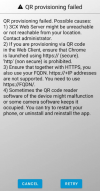
Hi 3CX expert, I have download 3CX Android apps and try scan QR code to provision the extension, but show QR provisioning failed.
Is there any configuration to do before scan the QR code?

1698387757250.png
 
What is your https port? Also from the mobile device are you able to reach the PBX FQDN?
 
What is your https port? Also from the mobile device are you able to reach the PBX FQDN?
What is your https port?
Https port : 443

Also from the mobile device are you able to reach the PBX FQDN?
may i know how to check this
 
From your mobile simply open a browser and type the FQDN(https://fqdn), do you reach it?
 
The client needs to contact the PBX with the FQDN in order to provision. In this case you need to check your firewall.
 
The client needs to contact the PBX with the FQDN in order to provision. In this case you need to check your firewall.
You mean the server firewall?
 
It seems that the issue is with the PBX side firewall.
 
and dont forget to do the split DNS thing if you're connecting internally over wifi, saves going out then back in to the network
 
Status
Not open for further replies.

Forum statistics

Threads
111,974
Messages
590,081
Members
164,899
Latest member
mazet