3CX Azure V16 and V18 upgrade recording hard disk

Status
Not open for further replies.

eds.pare

Free User
Joined
Aug 1, 2021
Messages
70
Reaction score
8
Hi We currently have a v16 3CX in Azure with an separate hard disk for the recording.

If we create a new 3CX with a v18, will the recording be read in the v18 if we remove from old server and remount it in the new server?

Thank you.
 
Hi @eds.pare,

This shouldn't be a problem. I suggest you:
  1. Take a backup of your v16 system, without recordings. Download it.
  2. Shut down the v16 instance.
  3. Create your new VM, install v18 using your backup. (do not remount your recordings disk before the installation - it can wipe it if you mount before).
  4. Once installation is complete and you see the v18 PBX is running without issue, remount your recordings disk.
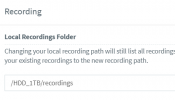
  5. Ensure that the mount path is identical to the one that you used in v16.
 
This Path right?
1636535345786.png
 
  • Like
Reactions: eds.pare
Okay thank you.
 
Hi @eds.pare,

Following up, did the installation and remount of the recordings drive work for you?
 
still waiting for the window slot for the downtime :D
 
  • Like
Reactions: VasilisV_3CX
Okay @eds.pare! Thanks for the update, I'll leave it to you to update me when it's complete going forward.
 
Status
Not open for further replies.

Forum statistics

Threads
111,975
Messages
590,084
Members
164,901
Latest member
Silent_Guru