


- Joined
- Aug 23, 2021
- Messages
- 2
- Reaction score
- 2
Hi, when I assign BLF keys from 3CX, they all get assigned on the phone itself even if I have an EXP-50 module installed (who stays blank). Currently the only way to add BLF's or Speed Dials that I want them to be on EXP-50 module is locally on the phone "Dsskey > Ext Key". However, the issue is when a new template is pushed by the 3CX automatic updates, it makes all that data disappear for my customer and is grayed out on the phone locally and would have to input all data again.
Is there a way to ensure data no longer dissappears by assigning BLFs to the expansion module within 3CX and not locally? If I add BLF's they stay fine on the phone itself, just not on the expansion module.
Thanks
3CX version 18.0 (Build 461)
Product Enterprise Annual
On-premises Windows Server 2019
Yealink T54W Firmware Version 96.86.0.63
Provisioning Method Local LAN
No custom Phone Templates are being used
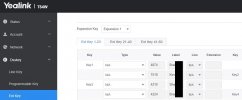
Is there a way to ensure data no longer dissappears by assigning BLFs to the expansion module within 3CX and not locally? If I add BLF's they stay fine on the phone itself, just not on the expansion module.
Thanks
3CX version 18.0 (Build 461)
Product Enterprise Annual
On-premises Windows Server 2019
Yealink T54W Firmware Version 96.86.0.63
Provisioning Method Local LAN
No custom Phone Templates are being used


