- Joined
- Jun 23, 2021
- Messages
- 2
- Reaction score
- 0
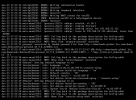
I'm having this issue on the 3cx Debian install, been debating using 3cx to replace our Asterisk system but after selecting a host name and a keyboard layout, I'm stuck at this.
It's a VM on vSphere v7.0.2, I've tried it on both my AMD and Intel cluster, I've tried downgrading the VM hardware to match v6.0 of ESXi, I've tried both the Debian 9 and Debian 10 3CX beta (we have a ton of Debian machines on our network today currently too). I'm kind of out of ideas on my side.
Not *really* a fan of deploying 3CX on Windows so trying to avoid that.
Edit:
I can "Ctrl + C" my way back to the previous prompt, so it's not frozen just presenting a prompt I can't see?
Edit 2:
Backing out twice and going to the main prompt list allows me to skip the rest of that step, maybe I'll be good?
Edit 3:
This left me with a non-functional keyboard and I couldn't complete the 3CX installation process.
It's a VM on vSphere v7.0.2, I've tried it on both my AMD and Intel cluster, I've tried downgrading the VM hardware to match v6.0 of ESXi, I've tried both the Debian 9 and Debian 10 3CX beta (we have a ton of Debian machines on our network today currently too). I'm kind of out of ideas on my side.
Not *really* a fan of deploying 3CX on Windows so trying to avoid that.
Edit:
I can "Ctrl + C" my way back to the previous prompt, so it's not frozen just presenting a prompt I can't see?
Edit 2:
Backing out twice and going to the main prompt list allows me to skip the rest of that step, maybe I'll be good?
Edit 3:
This left me with a non-functional keyboard and I couldn't complete the 3CX installation process.
Attachments

Last edited: