- Joined
- Oct 26, 2020
- Messages
- 8
- Reaction score
- 2
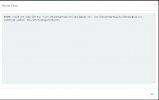
Hey peeps, we had this issue with two customers till now. After upgrading from v16 to v18 we are getting the below pop up window with no records shown
"XX000: could not load library "/usr/lib/postgresql/11/lib/plpgsql.so": /usr/lib/postgresql/11/lib/plpgsql.so: undefined symbol: EnsurePortalSnapshotExists"
When going to this path we can't even file this library file. it does exist on other V16 customers.
The upgrade path was direct (no alpha or beta).
I was thinking of taking a backup and doing a fresh installation using the v18 farfui directly. but just wanna find a way to resolve it directly before doing this.
cheers
"XX000: could not load library "/usr/lib/postgresql/11/lib/plpgsql.so": /usr/lib/postgresql/11/lib/plpgsql.so: undefined symbol: EnsurePortalSnapshotExists"
When going to this path we can't even file this library file. it does exist on other V16 customers.
The upgrade path was direct (no alpha or beta).
I was thinking of taking a backup and doing a fresh installation using the v18 farfui directly. but just wanna find a way to resolve it directly before doing this.
cheers