


- Joined
- Sep 18, 2024
- Messages
- 67
- Reaction score
- 16
Hi team,
We're currently facing issues with a small account, from time to time, the calls are getting cut ir present jumbles.
Their actual internet provider is Ayera, they stated the following argument for this ti be happening:
The issue appears to be towards the remote party. After I collected packet captures I noticed that the traffic from the IP phones are not adding QOS markings to the VoIP traffic causing it be treated as bulk traffic. Could you look into having the traffic marked with the following DSCP values?
RTP: EF (SDCP 46)
SIP: CS3 (DSCP 24)
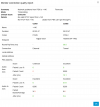
Is this something I should configurate directly on the IP phones templates, into the 3CX PBX or a router configuration? I ran a Monitor Connection Quality and I got the following results:
Should I open a support ticket to get this solved or there is something I could do to sort this out?
Thanks for all your support.
Sincerely,
Anthony
We're currently facing issues with a small account, from time to time, the calls are getting cut ir present jumbles.
Their actual internet provider is Ayera, they stated the following argument for this ti be happening:
The issue appears to be towards the remote party. After I collected packet captures I noticed that the traffic from the IP phones are not adding QOS markings to the VoIP traffic causing it be treated as bulk traffic. Could you look into having the traffic marked with the following DSCP values?
RTP: EF (SDCP 46)
SIP: CS3 (DSCP 24)
Is this something I should configurate directly on the IP phones templates, into the 3CX PBX or a router configuration? I ran a Monitor Connection Quality and I got the following results:
Should I open a support ticket to get this solved or there is something I could do to sort this out?
Thanks for all your support.
Sincerely,
Anthony


