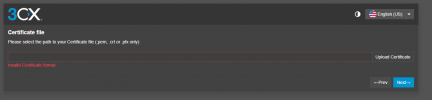
3CX Certificate Upload – Invalid Format Error

Samir Musa

Bronze Partner
Joined
Oct 14, 2025
Messages
3
Reaction score
0
When attempting to upload a valid certificate file (.pem) to the 3CX web management console, the system displays the error:


“Invalid Certificate format”

This occurs immediately upon file selection, preventing certificate upload and configuration completion.


Environment Details:
  • Platform: AWS EC2 (3CX Phone System )
  • 3CX Version: 20.0.7.1057 (Linux)
 
HI

Which certificate are you trying to upload, please, and for what purpose?
 
Hi Charles,
Thank you for your reply.

I’m deploying 3CX Phone System (v20.0.7.1057) on AWS (EC2 – Debian 12) using the official 3CX AMI from AWS Marketplace.
During the initial web setup, when I reach the step to upload the SSL certificate, I’m trying to use my own certificate file.

The certificate was generated as follows:
  • Files: cxkeypairrsa.pem
  • Bundled as PFX:
However, when uploading the .pem:


"Invalid Certificate format"

Could you please confirm the expected certificate format for AWS deployments?

1760453436208.png
 
Hi,

In this case, you will need to use a PEM file format and ensure it includes the intermediate and root certificates from the Certificate Authority (CA). You will also need to provide the private key file, also in PEM format.
 
Hi Charles,

Thank you for the clarification.

However, when I try to upload either fullchain.pem or the combined file with the private key included, I still receive the same error:

Could you please confirm:
  1. What is the exact structure expected by 3CX for the PEM file (order of certificate, intermediates, and private key)?
  2. Should the private key be included in the same .pem file or uploaded separately?
  3. Are there any specific file naming conventions or permissions required for the upload step during setup?

Thanks again for your help.
 
The certificate PEM file should include the server certificate, followed by the intermediate and root certificates, each separated by their respective -----BEGIN CERTIFICATE----- and -----END CERTIFICATE----- fields.


Please note that the private key PEM file is not included within the certificate file — it should be kept separate and will be requested once the certificate file has been uploaded.
 

Forum statistics

Threads
111,955
Messages
589,925
Members
164,853
Latest member
as7h