3CX Chat function suddenly not working properly when having multiple agents

Status
Not open for further replies.

danielseverns

New User
Joined
Jul 13, 2021
Messages
7
Reaction score
0
Today, we launched our chat feature after testing for a couple of weeks. We have had no issues when testing with admins but now that we have added multiple agents (logged in simultaneously - as contributors on wordpress) we are no longer receiving any active chats coming through, even though it shows we have 3 available agents active. It will work from time to time but overall, we have missed 70% of our chats. We have assigned each agent to a category as well. We have this installed on our WP site via plugin. URL is washingtonalloy.com

Any help is greatly appreciated!
 
Hi @danielseverns,

Are you using the Standalone version of Wordpress Live Chat?

If so, is there a reason you've chosen standalone over the 3CX Live Chat?
 
Hello, thanks for getting back to me. I am not sure what you mean by stand-alone version? Can you elaborate? We had to turn off the chat function today as we missed 75% of the inquiries coming in due to them not being visible in our active chat window. Thanks!
 
Hi @danielseverns,

We have three different ways to set up 3CX Live Chat:
  1. Linked to your 3CX PBX using the 3CX Live Chat Plugin in Wordpress
  2. Using the Standalone Wordpress version of 3CX Live Chat
  3. Using the HTML code generator
How did you set up your live chat, and if option 3, which type of site are you trying to set the Live Chat plugin on?

Once I know this info, I can begin giving you pointers.
 
I installed using the Wordpress plugin library. Assuming this would be the standalone 3CX version? Hope this helps!
 
Great, thanks for the update @danielseverns,

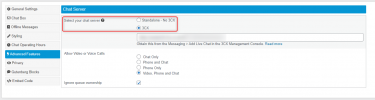
Now within the Live Chat plugin, you'll see two options under the Advanced Features section:

1626418769625.png

The Standalone does not link to a 3CX PBX and you manage the chats straight from Wordpress itself.

The 3CX Version links to a PBX and your 3CX extensions receive chats from the Web Client / Windows Client / Mobile Clients.

Which one have you selected in this section?
 
Thank you for the clarification.I have it selected as standalone. Should I switch to the other option?
 
Hi @danielseverns,

The standalone option requires users to be logged in to the Wordpress site.

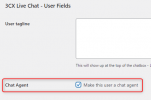
Each user must have the option"Make this user a chat agent" selected as shown below (from the users section).

1626676578747.png

After reloading the page (takes a minute or two), you'll see a section at the top of your page in the top bar:

1626676757176.png

By clicking the "Offline" button, you'll be enabling chat for your website.

1626676793570.png

Chat should now be ready to go.

Should I switch to the other option?

Personally I'd suggest it, as it's a better chat system where users can respond from their Web Client on their computer as well as their mobile devices. It's up to you though. If you'd like to walk through the process to set up the 3CX Live Chat version as opposed to the Standalone version, let me know.
 
Thanks for the reply. All 4 of our agents are logged into Wordpress and have the “make user a chat agent” checked. We can see their names in the top bar when clicking on “x agents online”. The problem is, since we have added the new agents and they are all logged in at one time we are no longer seeing incoming chats come through our “active chats” window. It works fine when only one person is logged in. Any idea how we can fix this?
 
Hi @danielseverns,

I'll investigate this and I'll get back to you as soon as possible.

UPDATE:

This issue may have happened due to multiple windows being opened. If you're unsure, make all of your agents log out in front of you, clear the browser cache and log in only once per agent. Create a test message, does it appear for all users?

The issue of the chat only appearing in the last window to be opened has been resolved in the next release of Live Chat.

If this continues to be a problem, I'd suggest switching to the 3CX version of Live Chat.
 
Last edited:
Status
Not open for further replies.

Forum statistics

Threads
112,149
Messages
590,965
Members
165,171
Latest member
Mahlon