Solved 3CX Chat on Website is disabled 1

Status
Not open for further replies.

Sintmacro

Free User
Joined
Oct 10, 2021
Messages
11
Reaction score
1
Hi, I'm using the 3CX chat on our website https://www.golfreizen.nu/ for a couple of months. Since this week, not know the exact date the Chat is Offline on the website. I've checked many settings but can't find why it's like this. When I use the direct 3CX Chat link this is working, but on the website it stays unavailable. Any idea what this could be?
 
Hi @Sintmacro,

Which version of live chat are you using? 3CX Live Chat (connected to the PBX via Wordpress Live Chat plugin, or via HTML code generator) or the Standalone version (installed on Wordpress but not connected to a PBX)?
 
Hi Vasilis,

Im using:

3CX version 18.0 Update 3 (Build 461)
Wordpress Version 5.9.2
3CX Live Chat (WP Plugin) Version 9.4.1

I've update last week the WP version to 5.9.1, would this be the isue?
 
It's connected to the PBX via Wordpress Live Chat plugin
 
Hello @Sintmacro ,

Can you please check whether any rules for redirection were added in your website?

check.js file for some reason is not served by your webserver. Adding to this in the network tab, I can see that the type of it is set to Redirect.

In our testing server this one is flagged as "script"

1647601310914.png
1647601239534.png
 
Where can I find the Check.js file?

There are rules for redirection but those are based on some pages.

Strange is that all was working for months very well.
 
Try to Save once more the Settings of the Live Chat plugin.

You should see a folder named wplc_data in the file system of the WordPress server in the wp-content folder.
 
Have done it, but it isn't. Very strange.
Can I download the plugin and install it again?
 
Of course. You will need to re-configure the plugin on clean installation.
 
Unfortunately all options didn't work and the CHAT is still disabled. Will it be a possible to download those files and upload them on the website to see if this works?
 
Don't see a code generator?
 
Hi @Sintmacro,

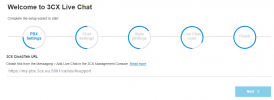
My colleague posted the link to the code generator in his post above. Click the link, follow the steps and you should be given your HTML code to insert into your site. You should see this page:

1648649918285.png
 
OK I see, this code is also to get from the plugin settings. But then I have only on one page a chat option I assume. Strange is still that the plugin works all the time but after upgrading WP it stopped working. So there must be an error related to the upgrade. Hope that there is an option to update the 3CX Live Chat Plugin with solving this issue.
 
Hi @Sintmacro,

Quick question, 3 days ago version 5.9.3 was released. Have you upgraded to it and does the problem continue to persist? I can see that your Live Chat button is still greyed out, if you've upgraded to 5.9.3 let me know and I'll PM you to troubleshoot further.
 
Just did the update but no result ;-(
 
Log into you 3CX Management Console and go to "Messaging", then click on the entry you have created for the Live Chat.

Can you post a screenshot here of what you see in the settings here?
(hide you FQDN and the Extension name though...)
 
Thanks for the help, I've deactivated all plugins and reactivated them one by one and found lucky the one that conflict with Live Chat, so now it's back working again ;-)

The problem was the plugin Page Children version 1.5.2.2 witch is Compatible till the WP version 3.9.36
 
  • Like
Reactions: VasilisV_3CX
Status
Not open for further replies.

Forum statistics

Threads
112,147
Messages
590,961
Members
165,167
Latest member
Finatra.us