3CX client and intune

Status
Not open for further replies.

Digital-Stewards

Silver Partner
Joined
Oct 30, 2020
Messages
53
Reaction score
8
Hi,

can anyone help me out how to remove the old "client" of version 16 and how can I install the new client v18 on a intune system (endpoint protection) where the user has no installation rights?

BR
 
Would like to know the same
 
Uninstalling I would think is something for another forum, not here.
The 'old' 3CX App can be uninstalled like any other Windows App, from the Control Panel.

We don't test deployment with Intune, but I am curious.
Have you tried deploying the new Windows Desktop App as you would other MSI files? If yes, what issue did you run into?
 
Easiest way I have found with other packages in intune is to set the old package to remove.

On the new package, setup a detection rules to only install if its not already got v16 installed.

You will need to do this using MSI GUIDs which you can get using the below command on a machine:

get-wmiobject Win32_Product | Sort-Object -Property Name |Format-Table IdentifyingNumber, Name, LocalPackage -AutoSize
 
  • Like
Reactions: Evolute IT
Uninstalling I would think is something for another forum, not here.
The 'old' 3CX App can be uninstalled like any other Windows App, from the Control Panel.

We don't test deployment with Intune, but I am curious.
Have you tried deploying the new Windows Desktop App as you would other MSI files? If yes, what issue did you run into?

I haven't been able to find the v18 msi file. For now I'm instructing everyone to download through the web client...
 
I haven't been able to find the v18 msi file. For now I'm instructing everyone to download through the web client...
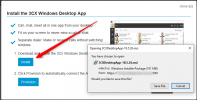
That's where you can get the Desktop App MSI file from....
1634205146201.png

What exactly is the problem because I have a feeling it has not been relayed correctly?
 
  • Like
Reactions: Evolute IT
I downloaded the 18.5.28 msi and added it to intune. But I see it in the company portal, I see it when I run the wmi command:

1636654708569.png

BUT I do not see the app itself??

If I manually do the install of the app it starts to install and immediately stops installing.

Any of you guys seen this behaviour?
 
It seems that that MSI is not able to be installed using /norestart /qn , nor is it able to install on a laptop where the user is no admin of the device. Usually if I start a exe or something a popup comes up and I can enter the admincredentials, but this does not happen either if I run the msi manually on the device.
??
 
Hi, I checked that out, but also there you install it first as admin.

Is there not an setup.exe I can download somewhere instead of this msi? I can then transform it to an MSI for intune.
 
Hi, I checked that out, but also there you install it first as admin.

Is there not an setup.exe I can download somewhere instead of this msi? I can then transform it to an MSI for intune.
Unfortunately not.
 
I can "unzip" the MSI and then just start the 3CX desktop app, that works....
But then the app is not really installed
 
Last edited:
  • Like
Reactions: NickD_3CX
Hey guys, you can simply put the MSI into intune - it works perfectly, that's how I deployed it. Definitely works
 
  • Like
Reactions: Evolute IT
Well I did that too, and intune says it is installed. But it is not, not even a folder or file in the appdata location where it should be.
This is on a new laptop, right out of the box.
 
Status
Not open for further replies.

Forum statistics

Threads
112,349
Messages
592,027
Members
165,513
Latest member
megalmazan