Solved 3CX Cloud based - Clients behind Sophos UTM-9 Firewall

Status
Not open for further replies.

benitok

Joined
Aug 23, 2017
Messages
37
Reaction score
6
Hi,

We've got a 3CX Server hosted in the cloud. On our internal network we have a 3CX SBC setup on a Raspberry Pi and we are using 3cx client on Windows laptops.

Everything works perfectly, but now we are in the process of installing a Sophos UTM-9 Firewall and we need some assistance on how to configure the firewall rules. Initial attempts have failed, so it is back to the drawing board.

I noticed the post https://www.3cx.com/community/threads/3cx-behind-sophos-utm-9-firewall.40813/ by @MillsAz which is very good, but he has an internal 3CX server where we have an external 3CX server.

Has anyone setup a Sophos UTM-9 Firewall with a 3CX Server hosted in the cloud?

Thank you,
Benito
 
You should only need to permit the SBC tunnel port and an https connection to your PBX so provisioning can work.

No special NAT required if you are using the SBC, pretty easy install when all is said and done.

Jason
 
You should only need to permit the SBC tunnel port and an https connection to your PBX so provisioning can work.

No special NAT required if you are using the SBC, pretty easy install when all is said and done.

Jason
Hi Jason, thanks. I think I spotted my mistake. I've got a opening on Monday to try the firewall again.

I forgot to mention, we do have 2 older SIP phones that cannot use the SBC controller so would I need to setup NAT for them?

Benito
 
Still having problems with the firewall and 3CX.

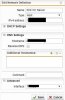
I've configured a Network Definition for our 3CX Cloud Server Public IP and hostname.
Network Definitions.JPG

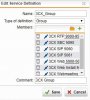
I've also configured Service Definitions for in a group called 3CX_Group. TCP 5000, 5001, 5015, 5061. UDP & TCP 5060, 5090. UDP 9000 - 9500 and 48000 - 65535.
Service Definitions.JPG

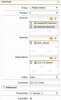
I then created a firewall rule to allow service 3CX Group from internal network to our 3CX Server.
Firewall rule.JPG

If I look at the log files it shows the rule being applied and access was given, but nothing works.

SBC log
Firewall log_3cx SBC.JPG

3CX Winows client
Firewall log_3cx client.JPG

3CX Server login

Firewall log_website.JPG


I see that the port being sent from the client side is totally different. Any advice would be appreciated, thanks.
 
When I say nothing works,

I cannot access the 3cx sever web console.
The 3cx widows clients cannot register.
The 3cx SBC and phones cannot connect.

Thanks,
Benito
 
I don't recall adding this, but on Interfaces & Routing -> Interfaces -> Additional Addresses -> my 3CX server was added to the PPPOE connection. o_O Once I removed it, I could access my 3CX Server in the cloud. My 3CX windows clients, SIP phone can register and connect.

I can make a phone call, but no audio. I assume this is to do with the NAT setup. I only configured Network Protection -> NAT -> Masquerading -> (Network: Internal network, Interface: PPPOE interface).

Should I remove Masquerading and setup NAT?
 
Fixed. All working now. Masquerading settings was correct. I had RTP service incorrectly configured on TCP and not UDP. I've also added my 3CX server to the exception list of Intrusion Prevention.

Edit: So my problem was, I had no Masquerading and incorrect RTP service configured as TCP and not UDP.
 
Last edited:
Glad the issue is resolved and thank you for posting your solution
 
Status
Not open for further replies.

Members Online Now

Forum statistics

Threads
111,835
Messages
589,291
Members
164,668
Latest member
Infinity Network