Solved 3cx contacts disappearing

Status
Not open for further replies.

HSM IT

Customer
Joined
Mar 8, 2022
Messages
16
Reaction score
2
The contact numbers/names of our clients have been deleted from the contacts list in 3cx.

This has happened about 3 to 4 times know. All of the contacts are deleted by themselves.

Can we check why/how the contacts are deleted ?
 
If you are on V18 you can check the Audit logs for it and see if it gets stated and by whom.
 
Hi @HSM IT,

Just to confirm, if you export your contact, is the .csv file empty?

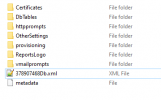
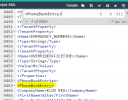
Also if you run a backup and check the .xml file in the backup, search "<PhoneBookEntry>" and check if they exist? If not then what @JosIPVG says would be really handy to check as that means that they are indeed being deleted and it is not simply an issue whereby they're not loading in to see or aren't displaying in the Management Console.


1646817066484.png
 
Thank you for your reply @joslPVG and @VasilisV_3CX

@VasilisV_3CX when I try exporting contact from 3cx the .csv file is empty.

I do 3cx backups every day and I check the .xml file in the backup, and search "<PhoneBookEntry>", they do exist.

Can I somehow pull the contact from the backup?

I don’t want to restore the backup file because that’s going to cause downtime on the 3cx phone.
We can’t do this because we are a 24/7 monitoring company, we can’t have phones not operating.

1646865607842.png
 
If you are on V18 you can check the Audit logs for it and see if it gets stated and by whom.
Thank you for your reply @JoslPVG, but we running V16.0.9. Can I still check?

If yes, please tell how(include steps).

Thnaks for you help once again
 
Can I somehow pull the contact from the backup?
No, not without a restore and lost of everything else. Or do a new backup, restore the old backup, backup contacts to csv and restore back the formerly created backup - a nogo as you said.

Build a new CSV import file by hand or build a macro which does it for you if that happens more often.
 
No, not without a restore and lost of everything else. Or do a new backup, restore the old backup, backup contacts to csv and restore back the formerly created backup - a nogo as you said.

Build a new CSV import file by hand or build a macro which does it for you if that happens more often.
thanks for the information @fx-bastler
 
Thank you for your reply @JoslPVG, but we running V16.0.9. Can I still check?

If yes, please tell how(include steps).

Thnaks for you help once again
V16 has no Audit log sadly , and just to mention V16 is coming to its end of life , maybe if you upgrade the issue will be resolved.
If it doesnt chances are you could find it in the audit log if someone manually removes them.
 
Hi @HSM IT,

I do 3cx backups every day and I check the .xml file in the backup, and search "<PhoneBookEntry>", they do exist.
When you check the backup, is that a backup that was taken before the contacts disappeared? Are you saying that ALL of your backups, even ones you take now, have ALL of the previous contacts in there?

I don’t want to restore the backup file because that’s going to cause downtime on the 3cx phone.
We can’t do this because we are a 24/7 monitoring company, we can’t have phones not operating.
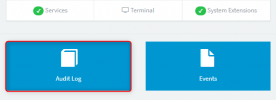
When you upgrade from v16 to v18, which is inevitable, you'll have some downtime (as this is the easiest option). When this happens, you could restore the backup in v16, then do the upgrade and from the moment v18 is online you'll have an audit log option present:

1646988762173.png
 
Hi @HSM IT,


When you check the backup, is that a backup that was taken before the contacts disappeared? Are you saying that ALL of your backups, even ones you take now, have ALL of the previous contacts in there?
The backup is before the contacts disappeared. I had a old contact CSV file which i have now imported back to 3cx.
When you upgrade from v16 to v18, which is inevitable, you'll have some downtime (as this is the easiest option). When this happens, you could restore the backup in v16, then do the upgrade and from the moment v18 is online you'll have an audit log option present:

View attachment 28579
Thanks, I will upgrade 3cx soon.
 
  • Like
Reactions: VasilisV_3CX
Great @HSM IT, let me know if you have any issues along the way! Will close this thread now, feel free to open another if you need anything else!
 
Status
Not open for further replies.

Members Online Now

No members online now.

Forum statistics

Threads
111,831
Messages
589,277
Members
164,660
Latest member
RJenkinsROCK