3cx CPU usage maxing out on dashboard

Status
Not open for further replies.

sugarCube

Free User
Joined
Apr 19, 2019
Messages
38
Reaction score
3
Hello All,
i noticed a problem recently on my 3cx, when agents are connected, the cpu usage gets to 100% and the management console stops working, this has started happening often, i don't know what the cause may be, please can anyone point me in the right direction to troubleshoot this.
 
Hello All,
i noticed a problem recently on my 3cx, when agents are connected, the cpu usage gets to 100% and the management console stops working, this has started happening often, i don't know what the cause may be, please can anyone point me in the right direction to troubleshoot this.
What size of VM are you using? Or what specs if physical?

Also, how are you setup? We need more info.

V16 or V15.5?
 
What size of VM are you using? Or what specs if physical?

Also, how are you setup? We need more info.

V16 or V15.5?
i have v16 running on a physical machine with debian, 16GB ram and 2TB disk, my license is for 128sim calls and i have about 190 extensions configured
 
i have v16 running on a physical machine with debian, 16GB ram and 2TB disk, my license is for 128sim calls and i have about 190 extensions configured
debian 9.9 in particular
 
Then you certainly have an issue somewhere.

Try seeing what service is using that much CPU when it happens. If IVR or Queue or else.
 
OKAY, let me do that
 
  • Like
Reactions: Evolute IT
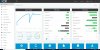
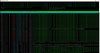
THe management console service seems to be the problem , it hogs all the cpu resources and then crashes, it does this continously, i have attached screenshots, i really need to get this resolved asap
 

Attachments

  • Capture.JPG
    Capture.JPG
    567 KB · Views: 22
  • Capture1.JPG
    Capture1.JPG
    173.5 KB · Views: 22
  • Capture3.JPG
    Capture3.JPG
    561.4 KB · Views: 20
Could try increasing memory to see if this helps
 
  • Like
Reactions: Evolute IT
Has anybody encountered this before, how can i fix it?
 
Hi @sugarCube

As a test, please enable the chat logs, purge any saved logs, and disable them again.

This we addressed an issue in the past that sounds similar to your case, see if this helps.

You might want to run a backup first before you proceed if you wish to retain the chat history.
 
  • Like
Reactions: Evolute IT
Sure it is installed on bare metal?

The reason I ask is the Dots of the CPU markers in the Management Console are "not in the right spacing" which indicates me there is a problem holding time.

If this happens all system services will register and de-register non stop and this causes massive load. Can you share more where the system is running on?

Also, is it installed from ISO or via apt? Do you have SWAP enabled on the OS?
(sudo apt-get install dphys-swapfile )
 
  • Like
Reactions: Evolute IT
sorry for my late response,
yes it's on a bare metal server HP proliant ps server D380 Gen9 E5-2620v4, and it was installed from ISO, i need to check if swap is enabled though
 
  • Like
Reactions: Evolute IT
Will updating the solution solve this as there is a New 16.0 Update 3 ALPHA available on my installation, but i'll really like to solve and possibly find the root cause of this and why it affects the management console service
 
Will updating the solution solve this as there is a New 16.0 Update 3 ALPHA available on my installation, but i'll really like to solve and possibly find the root cause of this and why it affects the management console service
If this is a production system, DO NOT update to the Update 3 as it's in Alpha stage (even before a Beta) so it might be extremely unreliable.

I suggest duplicating the instance with a new key (backup + restore without key and FQDN) and update the new one to U3 Alpha. Perform some testing and see if the issue arise.
 
so updating is not adviced and might not solve the issue eitherways, how can i proceed?
 
so updating is not adviced and might not solve the issue eitherways, how can i proceed?
Open a support ticket, that's your best option IMO.
 
I guess i'll try and do that, thanks for the help anyways guys
 
Have you done what was advised in #11 by @JohnS_3CX ?

GO in MC
12009
 
Status
Not open for further replies.

Forum statistics

Threads
112,360
Messages
592,107
Members
165,535
Latest member
bosdorf