3CX CRM Integration Wizzard POST issue

Status
Not open for further replies.

andrew.p

Forum User
Basic Certified
Joined
Sep 30, 2019
Messages
7
Reaction score
3
Hello. I have a CRM to which I want to POST Inbound/Outbound calls history. But using the wizzard I can't sent the following variables:
  1. call_id - there is no Call ID variable in 3CX. As a workaround solution I can try putting there Call timestamp including date and precise time, but it would be better to have a proper Call ID.
  2. direction - I should send "1" for Outbound and "0" for Inbound calls but 3CX offers only "Inbound" or "Outbound". Maybe I can somehow transform these variable values to 1 or 0? I see that 3CX wizzard has for example ToString function. Maybe it has some more which is not documented?
  3. file_url - a link for Call Record. It is one of the most important things which a proper CRM integration needs to must have.
 
1. There's no consistent call ID in 3CX, therefore not available.
2. You can do something like [IIf([CallDirection]==Inbound,0,1)]
3. Call recording is not available yet in the CRM integration at all. URL will come in U9/10.
 
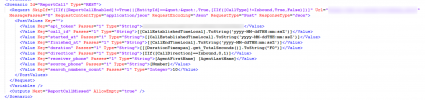
Thanks. Tried that and my XML output for ReportCall is1687264211514.png
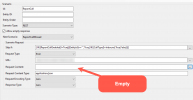
But in 3CX CRM Intergration App this field is empty. Is it ok?
1687264316257.png

After all Call Journaling using such a config didn't work. Is it a way to debug 3CX requests?
 
Thanks. Tried that and my XML output for ReportCall isView attachment 36053
But in 3CX CRM Intergration App this field is empty. Is it ok?
View attachment 36054

After all Call Journaling using such a config didn't work. Is it a way to debug 3CX requests?
You can debug using the wizard app itself.

And yes that field is empty if you use a POST json body.
 
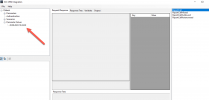
I tried but all the tabs are empty
1687268202914.png

At the same time Postman tests are ok.
 
Have you enabled the parameter value "ReportCallEnabled" to "True"? Otherwise it gets skipped. You also need an EntityId and EntityType to test.

The easiest is to install the template in 3CX, set logging to verbose (Dashboard > Activity Log > Settings), run a few test calls and then go to Dashboard > Activity Log > Logs > Instance, open 3CXSystemService.log and search for "CRM:", you'll see the full requests and responses from the integration.
 
Thanks, now it works. But the response states that these 2 variables have wrong format:

XML:
<Value Key="started_at" Passes="1" Type="String">[[CallEstablishedTimeLocal].ToString('yyyy-MM-dd HH:mm')]</Value>
 <Value Key="finished_at" Passes="1" Type="String">[[CallEndTimeLocal].ToString('yyyy-MM-dd HH:mm')]</Value>

This is an example from CRM documentation:
JSON:
   "started_at": "2019-02-24 09:16",
    "finished_at": "2019-02-24 09:17"

What could be wrong? Where can I see what exact values the wizzard sends to the server?
 
  • Like
Reactions: Evolute IT
I figured it out. It has to be like this:
XML:
<Value Key="started_at" Passes="1" Type="String">[[CallEstablishedTimeLocal].ToString("yyyy-MM-dd HH:mm")]</Value>
 <Value Key="finished_at" Passes="1" Type="String">[[CallEndTimeLocal].ToString("yyyy-MM-dd HH:mm")]</Value>
ToString("yyyy-MM-dd HH:mm") not ToString('yyyy-MM-dd HH:mm')
 
Status
Not open for further replies.

Latest Posts

Forum statistics

Threads
112,322
Messages
591,882
Members
165,469
Latest member
footandankle.my3fcx.us