3CX CRM Phonebook no longer updating

uhpadmin

Customer
Joined
May 22, 2017
Messages
48
Reaction score
2
We have recently upgraded to v20. When we were using v18, the CRM intergration to our SQL database worked fine.
An incoming phone call would pass through a SQL query to see if the phone number existed in the SQL database, and pass back details if it did.Then it would automatically create a CRM record in the phonebook.

Since upgrading to v20, this not longer works.
When I do a test in Integrations -> CRM, it says the integration functions properly, but no data is returned in the search results.

Would anyone have any advice which might get me on the correct road to getting this working properly?
 
You probably need to adjust your queries to use the variables as @number, @Agent and such.
 
we have the number as a variable in the stored procedure already and has been working for the last 5 years.
 
we have the number as a variable in the stored procedure already and has been working for the last 5 years.
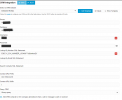
Can you show your config here?
 
  • Like
Reactions: Evolute IT
try using @number instead of [Number]
 
Interesting. I changed as recommended and got a different result in the test.
I didn`t even get this output when using [].

Started scenario with empty id
Request text: ConnectionString: Server=server;Database=db;User Id=user;Password=password!;
Statement: EXEC X_3CX_NUMBER_LOOKUP '%@Number%'

Response text: []
Response finished
Finished scenario with empty id

But still no results.
1728514535400.png
 
Last edited:
Try modifying your stored procedure to do the concat with the % each side, and send only the @number to the function.
 
ok.. the stored procedure was used as we query 3 different tables looking for phone numbers.
I don`t think it is sensitive info, so here it is.. not sure how to mod this as I didn`t write it.
The line which uses the number is
1728522221831.png
 
hmmm. that didn`t seem to work.
Same results when testing in integration page and no entry created when dialed in and answered.
 
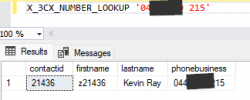
when i run the stored procedure in SQL, this is the result.
Wondering if the retured data isn`t the problem.
1728523379403.png
 
Remove the quotes when you pass the parameter, instead of:
EXEC X_3CX_NUMBER_LOOKUP '%@Number%'

Try with:
EXEC X_3CX_NUMBER_LOOKUP @number

Please note that @number is a parameter, and 3CX will specify a value for it. But if the parameter is inside quotes, it will be considered as static text by the parser....
 
  • Like
Reactions: Evolute IT
Thank you very much.
This fixed the problem.
Data was returned and after testing a CRM entry was created.
THANK YOU VERY VERY MUCH.
 
  • Like
Reactions: Evolute IT
Thank you very much.
This fixed the problem.
Data was returned and after testing a CRM entry was created.
THANK YOU VERY VERY MUCH.
Glad we could help! :)
 
  • Like
Reactions: Evolute IT