





Affected SQL database templates are MsSQL, MySQL, PostgreSQL.
On 15th December we informed customers to disable the SQL Database integration following CVE report 2023-49954 (https://cve-2023-49954.github.io/) This issue - identified by independent security researcher Theo Stein - concerned a legacy integration to query customer contact data directly from a SQL server database.
In the interest of disclosure, we’re publishing this update today ahead of the hotfix tomorrow. Read on for an explanation on the timeline, a technical description of the issue and a proposed solution.
Technical description:
If one of the Integration templates has been used (MsSQL, MySQL, PostgreSQL) they can be subject to SQL injection attacks if the 3CX server is available on the internet and no Web application firewall is in front of the 3CX machine. In that case it is possible to manipulate the original SQL query executed against a database.
Only the above-mentioned SQL Database Templates are affected (MsSQL, MySQL, PostgreSQL) and none of the other web CRM templates. Customers using MongoDB or any of our web based CRM integration templates are not affected by this.
Proposed solution
In general we still recommend strongly to use a modern secure web API, not direct SQL queries.
The CRM engine has been extended for SQL Database Templates to use parameterized queries where user input is passed as parameters for constructing the SQL queries executed against the database. This is required to avoid SQL injection.
Example;
SELECT id AS contactid, firstname AS firstname, lastname AS lastname, companyname AS companyname, email AS email, phonemobile AS phonemobile, phonemobile2 AS phonemobile2, phonehome AS phonehome, phonehome2 AS phonehome2, phonebusiness AS phonebusiness, phonebusiness2 AS phonebusiness2, phoneother AS phoneother, faxbusiness AS faxbusiness, faxhome AS faxhome,pager AS pager, photourl AS photourl FROM contacts WHERE phonemobile LIKE CONCAT('%',@Number,'%') or phonebusiness LIKE CONCAT('%',@Number,'%') or faxbusiness LIKE CONCAT('%',@Number,'%')
This ensures that user input is treated as data and not as part of the final query to be executed.
A hotfix will be provided tomorrow as follows:
- 18.0.9.23
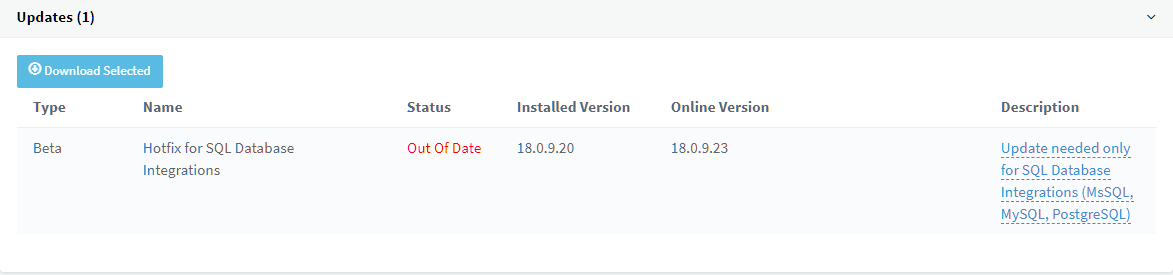
- 20.0.0.1494
If you don't need SQL Database keep on running on the current release builds. If you really need to enable it go to Updates and after the update re-enable SQL Databases. The administrator will need to update the integration code for SQL integration to work - all queries must be parameterized. This is a task which needs to be done by a database professional - and with great care. Again we reiterate to move to a modern secure REST API instead.
Examples
These are examples only. You have to make sure each query is securely formulated.
| Old way (Not Recommended) | New way (Examples only) | |
|---|---|---|
| Lookup By Number SQL Statement: | SELECT id AS contactid, firstname AS firstname, lastname AS lastname, companyname AS companyname, email AS email, phonemobile AS phonemobile, phonemobile2 AS phonemobile2, phonehome AS phonehome, phonehome2 AS phonehome2, phonebusiness AS phonebusiness, phonebusiness2 AS phonebusiness2, phoneother AS phoneother, faxbusiness AS faxbusiness, faxhome AS faxhome,pager AS pager, photourl AS photourl FROM contacts WHERE phonemobile LIKE '%[Number]%' or phonebusiness like '%[Number]%' or faxbusiness LIKE '%[Number]%' | SELECT id AS contactid, firstname AS firstname, lastname AS lastname, companyname AS companyname, email AS email, phonemobile AS phonemobile, phonemobile2 AS phonemobile2, phonehome AS phonehome, phonehome2 AS phonehome2, phonebusiness AS phonebusiness, phonebusiness2 AS phonebusiness2, phoneother AS phoneother, faxbusiness AS faxbusiness, faxhome AS faxhome,pager AS pager, photourl AS photourl FROM contacts WHERE phonemobile LIKE CONCAT('%',@Number,'%') or phonebusiness LIKE CONCAT('%',@Number,'%') or faxbusiness LIKE CONCAT('%',@Number,'%') |
| Lookup By Email SQL Statement: | SELECT id AS contactid, firstname AS firstname, lastname AS lastname, companyname AS companyname, email AS email, phonemobile AS phonemobile, phonemobile2 AS phonemobile2, phonehome AS phonehome, phonehome2 AS phonehome2, phonebusiness AS phonebusiness, phonebusiness2 AS phonebusiness2, phoneother AS phoneother, faxbusiness AS faxbusiness, faxhome AS faxhome,pager AS pager, photourl AS photourl FROM contacts WHERE email = '[Email]' | SELECT id AS contactid, firstname AS firstname, lastname AS lastname, companyname AS companyname, email AS email, phonemobile AS phonemobile, phonemobile2 AS phonemobile2, phonehome AS phonehome, phonehome2 AS phonehome2, phonebusiness AS phonebusiness, phonebusiness2 AS phonebusiness2, phoneother AS phoneother, faxbusiness AS faxbusiness, faxhome AS faxhome,pager AS pager, photourl AS photourl FROM contacts WHERE email = @Email |
| Search Contacts SQL Statement: | SELECT id AS contactid, firstname AS firstname, lastname AS lastname, companyname AS companyname, email AS email, phonemobile AS phonemobile, phonemobile2 AS phonemobile2, phonehome AS phonehome, phonehome2 AS phonehome2, phonebusiness AS phonebusiness, phonebusiness2 AS phonebusiness2, phoneother AS phoneother, faxbusiness AS faxbusiness, faxhome AS faxhome,pager AS pager, photourl AS photourl FROM contacts WHERE phonemobile LIKE '%[SearchText]%' or phonebusiness like '%[SearchText]%' or faxbusiness LIKE '%[SearchText]%' or firstname LIKE '%[SearchText]%' or lastname LIKE '%[SearchText]%' or companyname LIKE '%[SearchText]%' or email LIKE '%[SearchText]%' | SELECT id AS contactid, firstname AS firstname, lastname AS lastname, companyname AS companyname, email AS email, phonemobile AS phonemobile, phonemobile2 AS phonemobile2, phonehome AS phonehome, phonehome2 AS phonehome2, phonebusiness AS phonebusiness, phonebusiness2 AS phonebusiness2, phoneother AS phoneother, faxbusiness AS faxbusiness, faxhome AS faxhome,pager AS pager, photourl AS photourl FROM contacts WHERE phonemobile LIKE CONCAT('%',@SearchText,'%') or phonebusiness LIKE CONCAT('%',@SearchText,'%') or faxbusiness LIKE CONCAT('%',@SearchText,'%') or firstname LIKE CONCAT('%',@SearchText,'%') or lastname LIKE CONCAT('%',@SearchText,'%') or companyname LIKE CONCAT('%',@SearchText,'%') or email LIKE CONCAT('%',@SearchText,'%') |
| Call Journaling SQL Statement: | INSERT INTO calls (subject, contactnumber, contactname, agentextension, callstarttime, callendtime, callduration, calltype) VALUES('3CX PhoneSystem Call', '[Number]', '[Name]', '[Agent]', '[[CallStartTimeUTC].ToString("yyyy-MM-ddTHH:mm:ssZ")]', '[[CallEndTimeUTC].ToString("yyyy-MM-ddTHH:mm:ssZ")]', '[Duration]', '[CallType]'); | INSERT INTO calls (subject, contactnumber, contactname, agentextension, callstarttime, callendtime, callduration, calltype) VALUES('3CX PhoneSystem Call', @Number, @Name, @Agent, CONVERT(VARCHAR, @CallStartTimeUTC,127), CONVERT(VARCHAR, @CallEndTimeUTC,127), @Duration, @CallType); |
| Chat Journaling SQL Statement: | INSERT INTO chats (subject, contactnumber, contactname, email, agentextension, messages, chatstarttime, chatendtime, chatduration) VALUES('3CX PhoneSystem Chat Session', '[Number]', '[Name]', '[Email]', '[Agent]', N'[[ChatMessages].Replace("\'","''").Replace("\\","")]', '[[ChatStartTimeUTC].ToString("yyyy-MM-ddTHH:mm:ssZ")]', '[[ChatEndTimeUTC].ToString("yyyy-MM-ddTHH:mm:ssZ")]', '[Duration]'); | INSERT INTO chats (subject, contactnumber, contactname, email, agentextension, messages, chatstarttime, chatendtime, chatduration) VALUES('3CX PhoneSystem Chat Session', @Number, @Name, @Email, @Agent, @ChatMessages, CONVERT(VARCHAR, @ChatStartTimeUTC,127), CONVERT(VARCHAR, @ChatEndTimeUTC,127), @Duration); |
| Contact Creation from Client SQL Statement: | INSERT INTO contacts (firstname, lastname, companyname , email, phonebusiness) VALUES ('[FirstName]', '[LastName]', '[Company]', '[Email]', '[Number]');SELECT id AS contactid, firstname AS firstname, lastname AS lastname, companyname AS companyname, email AS email, phonemobile AS phonemobile, phonemobile2 AS phonemobile2, phonehome AS phonehome, phonehome2 AS phonehome2, phonebusiness AS phonebusiness, phonebusiness2 AS phonebusiness2, phoneother AS phoneother, faxbusiness AS faxbusiness, faxhome AS faxhome,pager AS pager, photourl AS photourl FROM contacts WHERE phonemobile LIKE '%[Number]%' or phonebusiness like '%[Number]%' or faxbusiness LIKE '%[Number]%'; | INSERT INTO contacts (firstname, lastname, companyname , email, phonebusiness) VALUES (@FirstName, @LastName, @Company, @Email, @Number);SELECT id AS contactid, firstname AS firstname, lastname AS lastname, companyname AS companyname, email AS email, phonemobile AS phonemobile, phonemobile2 AS phonemobile2, phonehome AS phonehome, phonehome2 AS phonehome2, phonebusiness AS phonebusiness, phonebusiness2 AS phonebusiness2, phoneother AS phoneother, faxbusiness AS faxbusiness, faxhome AS faxhome,pager AS pager, photourl AS photourl FROM contacts WHERE phonemobile LIKE CONCAT('%',@Number,'%') or phonebusiness LIKE CONCAT('%',@Number,'%') or faxbusiness LIKE CONCAT('%',@Number,'%'); |
Dedicated Security Forum for 24/7 Responses
The timeline provided in the CVE report is correct. The vulnerability reported to the licensing team was not recognised as a security issue, for which we have a dedicated security forum. For future reference, we ask that all reports of this kind are made in the Forum as it’s actively monitored 24/7 by product and security experts. Upon the recommendation of Mr Stein we will also be adding a Responsible Disclosure Policy in the footer of our website along with a contact address to route these alerts more effectively.
Follow Us for Updates
All affected customers have already been informed directly by mail. We’d like to remind all readers of our dedicated Security Alerts Forum. We urge all relevant parties to flag their concerns there.








 Copyright © 2026