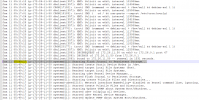
@Bonifacef as I can see from the auth.log and the syslog indeed the machine reboots.
For sure this is not caused from 3cx PBX.
As you may see on the attached screenshot, the Power Button and Sleep Button are triggered and after that an ssh connection is made on the machine.
I would recommend to check these logs with AWS Support Team as this is something that is related to the machine specifically.

Jan 11 05:49:17 ip-172-26-11-50 kernel: [ 0.000000] Linux version 4.9.0-14-amd64 (
[email protected]) (gcc version 6.3.0 20170516 (Debian 6.3.0-18+deb9u1) ) #1 SMP Debian 4.9.246-2 (2020-12-17)
Jan 11 05:49:17 ip-172-26-11-50 kernel: [ 0.000000] Command line: BOOT_IMAGE=/boot/vmlinuz-4.9.0-14-amd64 root=UUID=c9ac07d3-8239-4f4c-b6f9-352f3d4f90d4 ro quiet elevator=noop console=tty console=ttyS0 net.ifnames=0
Jan 11 05:49:17 ip-172-26-11-50 kernel: [ 0.000000] x86/fpu: Supporting XSAVE feature 0x001: 'x87 floating point registers'
Jan 11 05:49:17 ip-172-26-11-50 kernel: [ 0.000000] x86/fpu: Supporting XSAVE feature 0x002: 'SSE registers'
Jan 11 05:49:17 ip-172-26-11-50 kernel: [ 0.000000] x86/fpu: Supporting XSAVE feature 0x004: 'AVX registers'
Jan 11 05:49:17 ip-172-26-11-50 kernel: [ 0.000000] x86/fpu: xstate_offset[2]: 576, xstate_sizes[2]: 256
Jan 11 05:49:17 ip-172-26-11-50 kernel: [ 0.000000] x86/fpu: Enabled xstate features 0x7, context size is 832 bytes, using 'standard' format.
Jan 11 05:49:17 ip-172-26-11-50 kernel: [ 0.000000] e820: BIOS-provided physical RAM map:
Jan 11 05:49:17 ip-172-26-11-50 kernel: [ 0.000000] BIOS-e820: [mem 0x0000000000000000-0x000000000009dfff] usable
Jan 11 05:49:17 ip-172-26-11-50 kernel: [ 0.000000] BIOS-e820: [mem 0x000000000009e000-0x000000000009ffff] reserved
Jan 11 05:49:17 ip-172-26-11-50 kernel: [ 0.000000] BIOS-e820: [mem 0x00000000000e0000-0x00000000000fffff] reserved
Jan 11 05:49:17 ip-172-26-11-50 kernel: [ 0.000000] BIOS-e820: [mem 0x0000000000100000-0x00000000efffffff] usable
Jan 11 05:49:17 ip-172-26-11-50 kernel: [ 0.000000] BIOS-e820: [mem 0x00000000fc000000-0x00000000ffffffff] reserved
Jan 11 05:49:17 ip-172-26-11-50 kernel: [ 0.000000] BIOS-e820: [mem 0x0000000100000000-0x000000010fffffff] usable