3CX Directory Contact not showing the business number field

Status
Not open for further replies.

cpe90

Customer
Joined
Mar 7, 2023
Messages
78
Reaction score
19
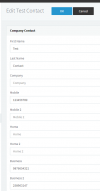
Is this by design that it only will show the Mobile field and not the Business number field?
Our users kept requesting that they want to see everyone's direct phone number and not just the extension number so they can give it out to the external users.
Is there a tips and tricks to do this on the server?
Any input or feedback is greatly appreciated.
Thank you.
 
If you are referring to seeing the company contacts on IP phones, then only the mobile number field will be seen on the IP Phone.
 
Not the desk IP Phone if that's what you are referring to but the 3CX app on the iPhones or Droid.
Is it still just the mobile number field that will show up?
Do you have any suggestions on how to make the direct (DID) number to show up on the directory?
Appreciate your help.
 
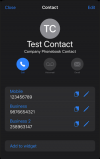
From what I can see, the 3CX Mobile app on IOS shows all the contact numbers entered in the company phonebook, for example:
1711566825846.png

1711566880079.png
 
  • Like
Reactions: Vali_3CX
Okay, thank you. You are correct. It does show up and I can see it now.

I think I see where the confusion is on our part.

In the contact, each user will have two entities showing up under contact with the same name.
1. Their extension
2. Their mobile number
They do not expect that the "direct number" or the "business" field is going to be under the mobile number entity like your screenshot above.

So I'm wondering, would it be possible to set the business field to show up first and then the mobile number?
Or, to be able to rename the field from mobile to business and vice versa so the direct number will show up first?

Thank you so much.
 
In this case, i'm afraid there is no way to edit these fields or change the order of appearance.
 
Status
Not open for further replies.

Forum statistics

Threads
111,974
Messages
590,081
Members
164,899
Latest member
mazet