Solved 3CX does not send SIP CANCEL to IP phone

Status
Not open for further replies.

helge.wiethoff

Premier Customer
Joined
Nov 24, 2020
Messages
11
Reaction score
0
We have the problem that several people cannot end calls correctly via the 3CX Windows app or via the web client.

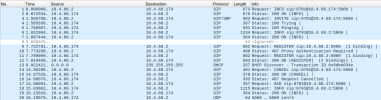
It works for extension 8701:
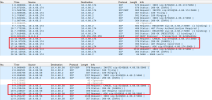
8717 is calling 8701. Using the 3CX Desktop App (v18.10.461) the call is ended. The call is also ended at the Yealink (10.4.68.174) -> SIP CANCEL packet 14.Bildschirmfoto vom 2023-01-09 09-14-41.png
It does not work on extension 8243: the call is terminated by 8717 as you can see the screenshot:
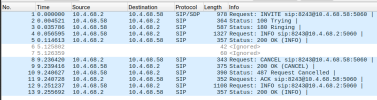
Bildschirmfoto vom 2023-01-09 09-16-37.png

I can reasonably understand via the 3CX desktop app encrypted traffic that on both calls a "hang up" results in some TLS packets to 3CX. Whether the 3CX server "sees" these I cannot judge. The log in 3CX is a little more revealing: In the Call Log for 8701 -> 8716 the entry "reason busy" is missing. This entry should be there if someone cancel the call in the app, right?
 
One difference in the two extensions is that one uses a Yealink T46S 66.86.0.5 (works) and one uses a Yealink T54W 96.86.0.74 (does not work).

I was able to verify this on other otherwise identically configured extensions. But I don't understand it at all now: Why does 3CX not send a SIP Cancel to a T54W?
 
Last edited:
Hi Helge,

1673512957875.png

According to your own screenshots, they both got the cancel message, and both replied 200 OK.

So what was it that caused you to think that the cancel message was not sent?
 
Hi John,

thanks for your reply. The difference is: In the first screenshot (8717 -> 8701) the call is correctly cancelled by "hanging up" inside the 3CX-Desktop-App.

In the second screenshot (8717 -> 8243) the call is not cancelled by "hanging up" inside the 3CX-Desktop-App but because 8717 cancelled the call because elsewhat the yealink T54W would ring "endlessly".
 
Maybe I understood wrong, can you please tell what IP is what?

10.4.68.2 = Looks like this is the PBX
10.4.68.174 = ?
10.4.68.58 = ?
 
10.4.68.2 = PBX / 3CX on-prem Debian Server
10.4.68.174 = Yealink T46S, extension: 8701
10.4.68.58 = Yealink T54W, extension: 8243
 
Hi Helge,

Ok, going back to what I said originally, in your 2nd screenshot this is what happens:
  1. PBX 10.4.68.2 said CANCEL to phone 10.4.68.58 (this is proof that 3CX sent the cancel)
  2. Phone 10.4.68.58 replied 200 OK (proof that the phone got a cancel and also accepted it)
Your capture does not show the issue that you are describing.
Maybe you posted the wrong capture?
 
Hi John,

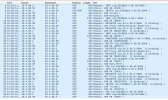
i made another call to explain it in more details. Thank you for your patience.

The call is made by 8717 to 8243 at 10:59:23.

The user with the extension 8243 has a yealink T54W (10.4.68.58) and uses the 3CX Desktop App (v18.10.461).

At 10:59:25 the call is ended by the extension user 8243 in the 3CX Desktop App. As you can see the yealink is still ringing.

Bildschirmfoto vom 2023-01-12 11-05-04.png
I hope I was able to describe the case better.
 
Hi Helge,

After reviewing the capture file, we checked the MC and saw that the call is indeed not being ended, which justifies why the phone never got a cancel. It appears like the call is stuck while the system is waiting for something.

You need to look into why the call was not considered to be ended yet and for that I can suggest the following.

Let's find out first if the hangup in the app is received by the PBX

  1. Go to the 3CX Activity Log in your management console.
  2. Change the Settings from the gear icon and set logs to verbose
  3. Make another call, and while ringing, end it again (just replicate your scenario).
  4. Check in the "calls in use" page and wait for it to end.
  5. Now return to the activity log and use the filter to select your last call
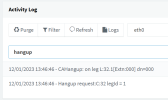
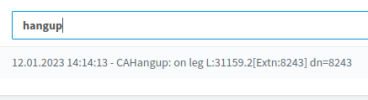
  6. You can now type hangup in the search bar to see if the hangup command from the app reached your PBX
1673528492189.png
 
Yes, i can see one of those entries. The other one "Hangup request" is missing:

Bildschirmfoto vom 2023-01-12 14-14-47.png
 
There is a "Load more" button on the bottom right of the page, it can show you additional logs for this specific call if you want to see some more.

But I would recommend to try another thing, just to eliminate the possibility of any settings causing this call to delay or appear stuck.

1. Delete the phone from your extension and factory reset the phone.
2. Create a brand new extension, leave all settings default.
3. Assign the phone to this extension and try calling it again to see if the problem stops.
 
Hi John, i did it exactly as you described.

I found something new:

The call can be canceled in the App if the dialer is configured "Calling by: Yealink ...":
Bildschirmfoto vom 2023-01-12 15-48-18.png

If the Desktop-App Dialer is configured with "call by: Desktop-Application", the call can't be canceled:
Bildschirmfoto vom 2023-01-12 15-51-20.png
 
Thats correct, if you have more than 1 telefon or app provisioned you need to cancel the call on every phone. When you calling by yealink, you just have 1 phone. If you call by desktop app, you have 2 (the yealink and the desktop app).

EDIT: sorry for my english
 
Thats correct, if you have more than 1 telefon or app provisioned you need to cancel the call on every phone. When you calling by yealink, you just have 1 phone. If you call by desktop app, you have 2 (the yealink and the desktop app).
What's the purpose of this?

I thought the typical use case for the desktop appl was for users to make calls from the home office. The IP phone then continues to ring happily in the office.
 
Yes correct, you have 2 phones. You can mute the phone in the office.
 
Yes correct, you have 2 phones. You can mute the phone in the office.
What's the point in muting the phone? The call is not ended but keeps ringing (silently).
 
What's the point in muting the phone? The call is not ended but keeps ringing (silently).
Yeah, i know. You cant fix this. But why you want to reject any calls? Just switch to dnd if you dont want to talk to someone.
 
Yeah, i know. You cant fix this. But why you want to reject any calls? Just switch to dnd if you dont want to talk to someone.
We have a lot users who forgot to switch to dnd when they are in a video conference. Those want to end the call.
 
Does the call ring endlessly if the user accepts the call?

If it only rings endlessly when the user rejects the call, train the user instead to click the "voicemail" button instead.

Reject = reject the call on this sip device only
Voicemail = move the call from ringing to voicemail (and the PBX will send cancel to all devices).
 
@helge.wiethoff I was under the impression that your scenario is somebody calls your extension, the caller decides to hang-up before you answer, but your phone keeps ringing.

But it seems like you agree with what @bitn2 said which is a completely different scenario: the caller does not end the call, instead you choose to reject the inbound call on one of your endpoints, but other endpoints keep ringing.

So which is it scenario A or B ?
 
Status
Not open for further replies.

Members Online Now

Forum statistics

Threads
111,832
Messages
589,278
Members
164,662
Latest member
DejanMDS