3CX doesn't recognize incoming call

Status
Not open for further replies.

bernhardt

Free User
Joined
Oct 14, 2019
Messages
8
Reaction score
0
Hi,
I couldn't find an answer to my problem, so I am opening this thread.

I have a 3CX set up on a local server, connected via a static IP to the internet.
I have 2 SIP Trunks, one which is registering with login/password and the other one is IP based, so no login needed.

An incoming call from the registered SIP Trunk is properly recognized and sent to the configured extension.
But an incoming call from the SIP Trunk which is only IP based and has no login/password is not recognized. I can see the invites hititng the server (with wireshark), but the 3CX is not recognizing it.

Can someone point me in the correct direction? Do I need to provide more detailed information?

Thanks a lot in advance.
Berny
 
number is received from provider IP based?
Are sip provider 3CX supported ?
Are you running latest 3CX V16 SP3 ?

Change inbound rule and start with *XXXXXX (change X by end digits of DID number)
 
yes, number is received from provider IP based

no, provider is not 3CX supported but sends to port 5060 on which 3CX is listening
the registered SIP Trunk provider is also not 3CX supported but works fine

yes, running latest 3CX V16 SP3 (16.0.3.676)
 
Change inbound rule and start with *XXXXXX (change X by end digits of DID number)
I can't change the number of the inbound rule, I can only choose between configured DIDs
 
Hello @bernhardt

You probably have a source identification issue which occurs when the PBX cannot match the incoming call to a trunk so it asks for authentication.
This can occur either because the format the provider is sending the DID into the PBX does not match the format of your DIDs in the management console or you have the same DIDs in multiple trunks or your Source identification source settings are wrong.
Here is how the 3CX PBX handles incoming calls: https://www.3cx.com/docs/sip-trunk-inbound-calls/

Since you are using wireshark open the Invite from the provider and check the formal of the number used by the provider. It is usually sent in the To: UserPart SIP field. For example your provider might be using the international format number e.g 123456789 but your DIDs might be in the E164 format e.g. +12346789. Change your DIDs to match the providers format. Alternatively you can use a wildcard and reformat your DIDs to match all formats e.g. 23456789. This way the PBX will only try to match the digits after the "" character and ignore everything that comes before.
 
Hi,
first, thanks a lot for the fast replies.

I attached a pcap (zipped) of the call and hope for further assistance.

The provider is sending the DIDs with E164 incl. leading +, just as the DIDs are configured in the 3CX. I changed the DID to be *63329129599 and 63329129599 but that did not help. I also played around with Call Source Identification to match for the IPs and disabled it, to no avail.

In my point of view, the 3CX just needs to check for the called number in the To SIP Field and send it to the extension which holds this DID. For now, I do not need to check for the SIP Trunk from which the call came from.

What I can see is, that the provider is sending the Invite from IP A and has IP B in the To SIP Host Part and IP C in the Contact URI Host Part, which is irritating.
The SIP Trunk in 3CX is configured for IP A. I also configured it for IP B and C but it did not help.

As you can also see in the pcap, the 3CX is not even answerign with a trying or so, which also irritates me. As far as I understood from https://www.3cx.com/docs/sip-trunk-inbound-calls/, the call should be rejected, if the 3CX can't figure out, where to send it.

Thanks a lot in advance.
Berny

[Edited by Administrator]
 
Last edited by a moderator:
How many digits are your public phone numbers? your DIDs are more than 12 digits?
 
We are experiencing a similar issue with a supported trunk from GAMMA (with calls prefixed with hidden caller-ID 141) but we have a massive estate using this provider so are surprised to see this occurring now. Showing a: 488 Not Acceptable Here

@YiannisH_3CX nice inbound guide, this will be helpful I think.
 
Not sure who your provider is but what is sending in the Invite is not supported by us. First the Invite sent is too large and becomes fragmented. Then the provider is sending something is the message body i have not seen before. I would recommend switching to a different provider preferably on from our supported list. https://www.3cx.com/partners/sip-trunks/
And check your IP blacklist as the IP of the provider might be blacklisted

Also please try not to post wireshark captures in the forum as they include a lot of sensitive information.
 
We are experiencing a similar issue with a supported trunk from GAMMA (with calls prefixed with hidden caller-ID 141) but we have a massive estate using this provider so are surprised to see this occurring now. Showing a: 488 Not Acceptable Here
Yours is a different case as the PBX replies back. I think you may find that the issue is with Call source identification not matching the inbound call and the PBX rejects the call as the DID is present in 2 trunks.
 
How many digits are your public phone numbers? your DIDs are more than 12 digits?
Yes, we do have variable length of phone numbers in Germany with a max of 13 digits (national) and max of 15 digits international.
 
@YiannisH_3CX Thanks a lot for your advice.
Could you point out, what in the Invite is not supported or point me to a document? Or is it just the fragmentation of the Invite?
 
Ok , so can you try for test inbound rule only with last 6 or 8 digits and see if behaviour is the same
 
Ok , so can you try for test inbound rule only with last 6 or 8 digits and see if behaviour is the same

How could I test that?
The numbers we got from that particular provider are at a fixed length of 11 digits, excluding the 0 for national calls.
Do you mean, I should try to get shorter numbers?
 
no in inbound rule just try to set last digits of number, for example your did is 0123456789, then just set
*456789
 
@aws2p Tried it, but did not help.

I will check with the provider, if he can reduce the headers for the Invite to be under 1500Byte, so that it is not fragmented.

Thanks a lot for your help.
Berny
 

Attachments

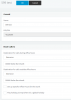
  • Unbenannt.PNG
    Unbenannt.PNG
    16 KB · Views: 19
You're welcome
 
Status
Not open for further replies.

Forum statistics

Threads
111,934
Messages
589,818
Members
164,811
Latest member
aurorasigntrtechitnet