3CX Erratic Call logging to Hubspot

Status
Not open for further replies.

Vernon Cheung

Free User
Joined
Feb 17, 2021
Messages
5
Reaction score
1
Hi All,

I am finding erratic behaviour in call logs in Hubspot from 3CX.. The integration and testing seem to be fine but I am finding calls are not consistent and are not pushing through to Hubspot.

I came across one of our sales users mentioning that the Hubspot dashboard was not displaying calls correctly. I looked at a outbound call record on 3CX and and I saw that it is random when a call gets logged, be it answered or unanswered

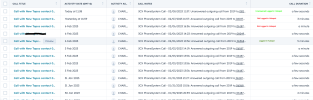
Example logs with a few markings as reference from both Hubspot calls and 3CX call log from the same extension 2019. All numbers are being dialed in the same 10 digit manner aswell.

3CX and Hubspot Call Log - You will see below that I have marked some calls as being logged in Hubspot from the same extension and others aren't from 3CX
3cx Call logg C.png

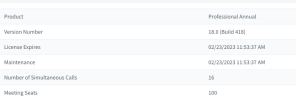
3CX Screen.png
  • 3CX Version - Standard Annual 18.0.5.418
  • Server OS - Debian 10
  • Is the 3CX Server Hosted and where? Hosted in AWS
  • IP Phone Make/Model/Firmware version, Yealink T23g latest firmware
  • Has the Firewall Checker passed: YES
  • Are custom Phone Templates being used: NO
I am hoping this makes sense and someone can assist

Thanks and regards

Vernon
 
If you have a Standard license, the integration wouldn't work. Make sure your license is actually Pro or Enterprise.
 
Hi Concept,

I didn't even realize you could do the integration on a standard licence

regardless we are 100 % on Pro Licence,

Screenshot 2023-02-08 at 16.21.06.png
 
Hi Concept,

I didn't even realize you could do the integration on a standard licence

regardless we are 100 % on Pro Licence,

View attachment 34115
I do see that was my fault initially for posting standard licence in my initial post.. Apologies for that
 
  • Like
Reactions: Evolute IT
As for the call logging, we do see the calls logged in HubSpot, even when you write "Not logged". So what's the actual calls that are not being logged?

Note that in some cases, it's impossible to log the call if there was no destination or the call was dropped before it could reach one.
 
  • Like
Reactions: TheodorosG_3CX
As @ConceptsWeb mentioned we do see calls logged in the CRM. As stated this depends on how where the calls being terminated from the provider side.
 
  • Like
Reactions: Evolute IT
I am still currently doing testing on the system but the actual screens actually didnt explain it all to well as my "labels" where actually incorrect/confusing.

A better example of this is calls just on the 8 Feb from the extension 2019 and also taking what you mentioned regarding no call destination or dropped calls into consideration.

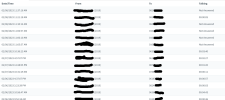
Image below displays all calls logged on the 8 Feb On Hubspot of which only 2 calls are logged

1. 02/08/2023 16:05: Answered outgoing call from 2019 to 07967...
2. 02/08/2023 11:37: Unanswered outgoing call from 2019 to 0827...

Screenshot 2023-02-09 at 09.25.07.png

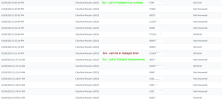
the second Second images is a log from 3CX for Extension 2019 of which there are 16 calls in total. So taking your dropped calls into consideration some of what you said makes sense. But for the call below labeled " 3cx - call not in Hubspot" there is a destination and the calls was just over 5 min long, also the call that is 1:25 is also not logged

02/08/2023 2:21:10 PMCharlton Mouton (2019)08340****00:01:25
02/08/2023 2:11:43 PMCharlton Mouton (2019)01149*****00:05:04

The 2 calls labeled in green are the only 2 calls that where logged into Hubspot on the 8 Feb if you use the image above as reference

char-calls-8feb.png

Since yesterday
  1. I did download the server side integration on the CRM integration on the system
  2. Changed the query CRM to - always
  3. changed the Contact create to - Inbound and Outbound. It was previously just on inbound
I hope this highlights my issue a little better.

Thanks in advance
 
Please note that only from screeshots it is not possible to advice as this requires further analysis from the PBX logs. I would suggest that you create a Support Ticket.
 
Was there any resolution to this issue? We have a somewhat similar issue with our 3CX to HubSpot integration. Up until January 2023, calls were being successfully logged into our HubSpot log, but all of a sudden they stopped. Opened tickets with HubSpot, but they just issued a canned response about not being responsible for 3rd party integrations and to ask the 3rd party developer for support.
After some searching, nothing I attempt seems to help - the calls which were logged before just stopped logging. Integration tests between 3CX and HubSpot remain successful and data is returned properly, so I am not certain if it's a 3CX or HubSpot issue at this point and HubSpot refused to investigate.
 
@Scot Busby this is totally different issue than the described in this post. In your case you are not able to journal any calls but this requires further investigation. I would suggest that you create a ticket to the 3CX Support for further analysis.
 
  • Like
Reactions: edossantos
I'm having the same issue. Integration is working, but some calls, erratically, are not logged on Hubspot. Any advise?
 
Hi @hernanp,

After much testing with HubSpot and the 3CX instance, we found our issue to be related to a couple of things.

  1. We have more than one Contact related to a single Company in HubSpot, so calls are journaled on the contact which was created first in HubSpot. There is an HubSpot ID associated with the contact which you can use to tell which is the first one.
  2. Our phone number formats were inconsistent with the formats accepted by the 3CX integration. We made a list of the formats which worked and which did not work by using the CRM Testing in 3CX. There are several methods you can use to fix the formatting issues depending on how many contacts you have in HubSpot. You can fix them manually through the HubSpot UI, you can export to Excel, fix and then re-import the contacts or you can use a 3rd party tool called Phone Number Formatter from Integration Fox.

We chose to use the integration tool because it continues to monitor and properly format the phone numbers after fixing them. We used this tool initially to fix the initial contact phone numbers, but they quickly were mis-formatted again, for various reasons.

This might not be the cause of your issue, however, these are the things we used to resolve our problem. Good luck and let me know if there is anything I can do to help.
 
Thanks. That might be it, when using 3CX click2talk on a +1XXX number, is not logging it. if we manually remove the +1, it works.
Is there anything that could be done on the 3CX side to actually understand that this is a valid number? If not, what do you advise?
 
  • Like
Reactions: edossantos
I keep having the same issue. I've normalized all numbers in Hubspot companies phone numbers and they all now export as 1NPANXXXXXX.

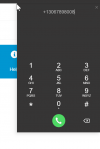
When I click on the number on hubspot to call, 3CX click2Talk shows +1NPANXXxxxx, and immediately changes to 1NPANXXxxxx.

I still cannot make it work properly, it does not always get the information from Hubspot when dialing.

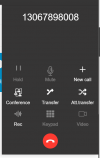
This is what 3CX shows as active calls:
calls 2023-06-02 3xc.png

The callee number is properly formated with the 1NPANXXxxxx, but still, is not adding the call to Hubspot.

Can anyone confirm which phone field is being queried from Hubspot? Is it the company or the contact number?


Here are some more screenshots to illustrate:

Number on screen:

1685721896765.png


When clicking, 3CX shows this:


1685721934478.png


When click on dial, shows this:

1685722006825.png


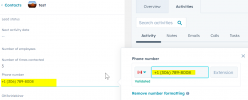
Contact in Hubspot:


1685722133944.png


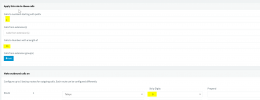
Here is 3CX outbound rule, keeping the 1

1685722260663.png

And here is the SIP trunk, which does not change the 1NPANXXxxxx

1685722329987.png


I think I tried everything.

Thanks so much everyone for any advise.

Hernan
 
Last edited:
Hi @hernanp,

What does the 3CX CRM integration with HubSpot do when you test? This is where I did most of my testing to see which formats worked and which ones did not. If you go to 3CX Settings --> CRM, you'll see a CRM Provider Configuration and there will be a "TEST" button you can click. Enter in a number which is a contact in your CRM and it should return valid contact information. If it does, you know your integration is working. If it does not return any valid contact information, there is either something wrong with the integration setup or the format of the number.

Otherwise, it seems like you have things setup correctly (from my perspective). :)

Thanks!
 
When clicking, 3CX shows this:


1685721934478.png


When click on dial, shows this:

1685722006825.png
This is probably due to the configuration you have in the Web Client > Settings > Audio / Video > Replace + with
 
Thanks Scot.

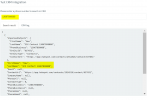
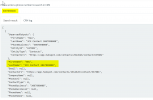
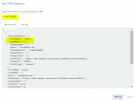
I was not using that test feature, so did some tests, and it definitely works. I get 3 different results, all found, for the same number with different prefixes. See these 3 screenshots...

1685730010226.png


1685730044377.png


1685733358976.png


What I need to understand is exactly what the 3CX webapp is sending when using the the 3CX click2call link to Hubspot, and then I could normalize all numbers according to that...
 
In your screenshots we can see that only in the third case you got the existing contact from the CRM. In the first 2 attempts, the integration created 2 contacts, because the existing one was not found. So you will need to send the numbers in E164 format, i.e. with the plus (+) prefix and country code.

Also, please note that in 3CX v18 Update 8 we're improving the way in which we do the contact matching, and sending the number with or without the plus prefix should work. So maybe you will want to wait for this update.
 
  • Like
Reactions: Evolute IT
Status
Not open for further replies.

Forum statistics

Threads
112,147
Messages
590,960
Members
165,167
Latest member
Finatra.us