3CX failed to establish a TCP connection to activate.3cx.com

Status
Not open for further replies.

mynetsupport

Free User
Joined
Mar 14, 2023
Messages
3
Reaction score
0
Hi all,
Encounter this error message on my Self-hosted/ On-Premise 3CX Server License page.
"3CX failed to establish a TCP connection to activate.3cx.com. Ensure that the local or border firewalls are configured to allow outbound traffic to activate.3cx.com"

Test ping to activate.3cx.com is working.
Try access activate.3cx.com on browser and bring me to a blank page. (See attachment)
3CX Server dns already set as 8.8.8.8
Restart the server a couple of time, but still same error.

Current system run on Debian 10, Windows Hyper-VM.
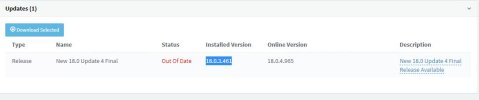
3CX version - 18.0.3.461 (Installed) (see attachment)
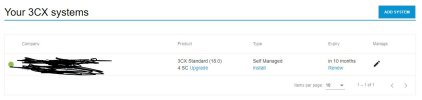
License on 3CX portal still activate.(see attachment)

Please advise how can I fix this issue. Thanks in advance.

 

Attachments

  • 3cx web result.JPG
    3cx web result.JPG
    20.9 KB · Views: 83
  • 3cx version.JPG
    3cx version.JPG
    26.2 KB · Views: 84
  • Portal License.JPG
    Portal License.JPG
    38.7 KB · Views: 82
That is a problem when you didnt update your stuff. If this is to complicated for you, just switch to auto update or use hosted by 3cx. To resolve your problem now, take a backup, reinstall und restore. It takes maybe 15 minutes to get your pbx back running.

The problem is initially caused by the fact that 3CX makes it so a reasonably recent version (18U7 is less than a year old) to communicate with the license server. Thát is the real problem and THAT is something which I consider lazy programming. There is simply no excuse for that.

You seem to think that the problem is caused by the end-user, but in such a scenario it would be common sense to have your license server accessible to previous versions. In fact, there is not a license-server I use in our company which does not work like that. Mathematica, Helix, Perforce, they all work fine with older versions. For good reason too.

Furthermore, the 'backup / reinstall / restore'-plan doesn't take 15 minutes, especially not when you consider that some of us use VoIP-providers which require specific setups which are not stored in the backup, e.g. custom TCP/IP routing for specific IPs of SIP-trunks.

Just because you "deal" with 3CX in your daily-job often and have something restored in 15 minutes does not mean all of us are in the same boat. It took me half a day to do this on 3 on-premise installations for our company in 3 different countries and contrary to what a lot seem to think I have more responsibilities than to baby-sit a PBX.
 
This information was communicated from 3cx. Maybe you didnt read it. I dont have any pbx that takes longer than 15-20 minutes to restore. All you trunk settings are included in your backup. If you are using special stuff which is not included in your backup, thats also your problem. sorry. Maybe you should update your pbx automatically, its also the only way to get os updates.
 
  • Like
Reactions: jed
This information was communicated from 3cx. Maybe you didnt read it. I dont have any pbx that takes longer than 15-20 minutes to restore. All you trunk settings are included in your backup. If you are using special stuff which is not included in your backup, thats also your problem. sorry. Maybe you should update your pbx automatically, its also the only way to get os updates.

Obviously "all" is my problem - but you could also think "Hmm, why is the activation-server not simply accessible with an older version" to by-pass this shit-show ?

Suggesting auto-updates is not a good solution, most veteran system-administrators have bad experiences with this and as a long time user of 3CX (we started @ V10 in 2012) I know from experience some settings changed during updates, causing problems in continuity so I do not use automatic updates.

Rather than pointing out my "mistakes" you should have a look at what 3CX is doing: People who are on the most recent version (V18) but are missing 1 small update (U7 -> U8) are unable to communicate with the activation-server. And because you can't contact to the activation-server, you also can't update. That is fubar logic and absolutely the wrong approach, period. And it is not the first time, either.

I simply do not understand that people defend this. If Microsoft did something like this with their Office, people would get mad, and rightfully so.
 
Its more than 1 Update you missed. But sure, the activation server problem and that you couldnt update is not helpfull. You can use automatic updates manually, to avoid bad updates. This is still the only way to get os updates that you miss as well.

Why is "all" your problem? If you changed some parameters from your sip trunk its also in the backup.

https://www.3cx.com/blog/change-log/phone-system-change-log/
 
Its more than 1 Update you missed. But sure, the activation server problem and that you couldnt update is not helpfull. You can use automatic updates manually, to avoid bad updates. This is still the only way to get os updates that you miss as well.

Why is "all" your problem? If you changed some parameters from your sip trunk its also in the backup.

https://www.3cx.com/blog/change-log/phone-system-change-log/

As far as I remember it was 1 update when I had this problem (in November last year) - and the version I was running was most definitely already V18. There is something serious wrong with your update/support-policy if you think being on the same major version (V18) is not enough to contact the activation-server and thus access to the updates. The moment you're talking about "automatic updates manually" you go back to the "problem" that I have to babysit a PBX to make sure it keeps running. I don't have a problem with doing this occasionally, but looking back I had updated the PBX somewhere in May/June 2023 and encountered the problem in November 2023 which required to do a complete reinstall. If I'm 5 months behind on updates I should be able to contact acivation and update servers. Hell, this should work for at least 2+ years in my opinion.

As far as I know the only way to have a custom gateway (routes) for specific IP's is not available in the GUI but requires using the route-command to change the Kernel IP Routing Table. Changes to that are not stored in the backup.
 
This problem starts in June because of a certificate change on the activation server. i think you missed that update. As a PBX admin you need to check updates or let it do other people for you when you dont want to use automatic updates. The other problem with stuff you need to do on cli is also not supported and not a problem of the pbx. I think you need to rethink 3cx is the right pbx for you.

EDIT: the best way is to have a partner to do this stuff for you.
 
This problem starts in June because of a certificate change on the activation server. i think you missed that update. As a PBX admin you need to check updates or let it do other people for you when you dont want to use automatic updates. The other problem with stuff you need to do on cli is also not supported and not a problem of the pbx. I think you need to rethink 3cx is the right pbx for you.

EDIT: the best way is to have a partner to do this stuff for you.
I looked it up. The problem is two-folded and that makes it actually quite a bit more delicate: You can not update if your maintenance is due subscription-date and you can't activate if you're before U8b.

That means if your subscription ran out on October 2023 and you updated in August 2023 to U8a you also encounter the problem. That means you updated less than 2 months ago (!). Seriously, stop defending that - that is just flawed design. If you look at the patch-notes the only thing which U8b did was Updated: License Activation Certificate. So the SSL-certificate can't be updated while connecting to the server when you do a request. That is just lazy programming, nothing more.

I didn't pick 3CX - I'm merely the one who needed to fix it when things went fubar. But that is besides the point, I don't think any (paying) customer deserves this.

Anyhow, we're not going to agree on this, if you think missing 2 months of updates is enough to warrant downtime and out-of-office hours work we're disagreeing on such a level any further discussion on this matter is pointless.
 
I am with you that this problem is not great. But that you have this problem now is your fault because you didnt monitor your pbx. Especially pbx should be always up2date because of any security problems. Normally this could be resolved in minutes but in your situation it will be longer because of your unsupported sip trunk, thats also not the fault of 3cx.
 
Hi I am having the same problem. My version cannot install and download because the license cannot refresh. What are we supposed to do?
 
Hi I am having the same problem. My version cannot install and download because the license cannot refresh. What are we supposed to do?
Backup, reinstall and restore.
 
Same problem here on a windows server.

Solution was easy : change system date to a date before expiration, then update.
 
Status
Not open for further replies.

Forum statistics

Threads
111,952
Messages
589,904
Members
164,845
Latest member
tdzski5