3CX failed to establish a TCP connection to activate.3cx.com

Status
Not open for further replies.

mynetsupport

Free User
Joined
Mar 14, 2023
Messages
3
Reaction score
0
Hi all,
Encounter this error message on my Self-hosted/ On-Premise 3CX Server License page.
"3CX failed to establish a TCP connection to activate.3cx.com. Ensure that the local or border firewalls are configured to allow outbound traffic to activate.3cx.com"

Test ping to activate.3cx.com is working.
Try access activate.3cx.com on browser and bring me to a blank page. (See attachment)
3CX Server dns already set as 8.8.8.8
Restart the server a couple of time, but still same error.

Current system run on Debian 10, Windows Hyper-VM.
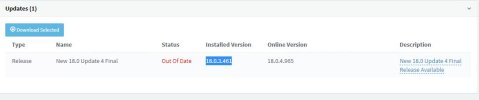
3CX version - 18.0.3.461 (Installed) (see attachment)
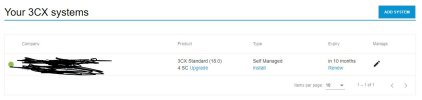
License on 3CX portal still activate.(see attachment)

Please advise how can I fix this issue. Thanks in advance.

 

Attachments

  • 3cx web result.JPG
    3cx web result.JPG
    20.9 KB · Views: 83
  • 3cx version.JPG
    3cx version.JPG
    26.2 KB · Views: 84
  • Portal License.JPG
    Portal License.JPG
    38.7 KB · Views: 82
Hi @mynetsupport,

Please be informed that the version the the Phone System is running is unable to communicate with the 3CX activation server.
Any version that is lower than V18 Update 5 cannot reach the activation server.

You can try upgrading the Phone System from the Management Console, but if that fails, you will need to take a backup and redeploy the machine using the latest 3CX ISO(https://www.3cx.com/phone-system/download-links/) and use the backup to restore the configuration.
https://www.3cx.com/docs/manual/pbx-backup-restore-failover/

NOTE: It is a good practise for the backup to be taken before you try to upgrade the Phone System.


Alternatively, you can switch to 3CX Hosted where we take care of the updates for you and you will not have this issue in the future.
https://www.3cx.com/docs/hosted-pbx-deployment/
https://www.3cx.com/ordering/pricing/hosted-info/
 
  • Like
Reactions: GregG_3CX
Hi GeorgeP,
Thanks for the advise. I will try to setup a new one and restore from the backup.
Another thing to check with you. This only happen this week. My users informed that the push notification on iPhone is not working, but on physical desktop, Windows 3cx app and android phone, all is working fine.
Could this unable to update issue cause this push notification on iPhone?
 
Hi GeorgeP,

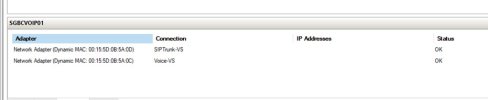
I managed to restore the system to the new version and able to perform a restore from the latest backup that I perform before power down the problem 3cx server. With the new server running, I am able to access through the web portal, login to both my windows 3cx app and mobile app. But now, I can only make internal call, ext to ext. When I try to call to an external number, there is no respond, no connection. I try calling the caller ID number, there is also no respond. I went through all the settings, from SIP Trunks, Inbound and Outbound Rules, Network and etc... all same settings as the old system. The only different I see is on the Hyper-V Manager, server Networking Tab. On the old system, I can see the IP address and MAC address as show in attachment A. But on the new system, I don't see anything - attachment B. Any advise?
 

Attachments

  • A.jpg
    A.jpg
    24 KB · Views: 37
  • B.jpg
    B.jpg
    22.5 KB · Views: 34
This issue should be fixed by 3CX…. I’m on version 18 Update 7 Build 312 and having this exact issue. It’s incredibly annoying to have to rebuild an entire system to fix this. Should absolutely not be this way!!… 3CX is more complicated to support on self hosted installs…
Especially when it can’t reach its own activation servers!!
 
  • Like
Reactions: MIkePTW
This issue should be fixed by 3CX…. I’m on version 18 Update 7 Build 312 and having this exact issue. It’s incredibly annoying to have to rebuild an entire system to fix this. Should absolutely not be this way!!… 3CX is more complicated to support on self hosted installs…
Especially when it can’t reach its own activation servers!!
The certificate of our activation server has been renewed. Your PBX must be updated to v18.0.8.917 in order to activate.
 
@J.R You don’t need to rebuild anything, just upgrade.
 
  • Like
Reactions: J.R
The certificate of our activation server has been renewed. Your PBX must be updated to v18.0.8.917 in order to activate.

Thank you, I will report back my results.
 
  • Like
Reactions: PanagiotisL_3CX
18.0.8.917 says it’s Alpha/Beta Update. I would probably recommend rebuilding to avoid running the Alpha. What are your thoughts?
 
18.0.8.917 is not an Alpha/Beta build. It is a hotfix of 18.0.8.912 which can be installed on production systems. See our Change Log for info.
 
  • Like
Reactions: GregG_3CX and J.R
@PanagiotisL_3CX It shows as beta in the management console, hence automatic updates won’t install it.

Installing it manually does upgrade to update 8.
 
  • Like
Reactions: J.R
The certificate of our activation server has been renewed. Your PBX must be updated to v18.0.8.917 in order to activate.
seriously? cant you give people notice on changes like this, my licence expires tomorrow so now i have only tonight to get my system working

i'm on 18.0.5.415 , my update option on the portal is only to 18.0.5.418, if i take this will i then see the option for the next update?

had similar issues with v16 so did the upgrade in sept to 18 would not expect to be forced to upgrade so quickly , especially considering your security breach issues
 
Last edited:
  • Like
Reactions: dmoorenot
especially considering your security breach issues
Why is your version this far beyond... anyway, ich would take a backup, reinstall the actual version and restore.
 
i'm on 18.0.5.415 , my update option on the portal is only to 18.0.5.418, if i take this will i then see the option for the next update?
Yes you would need to go in order. 18u8 is marked as a beta hotfix so needs to be done manually as noted above. Backups are a good idea along the way.
 
I am on 18 update 5 Build 418, getting the "3CX failed to establish a TCP connection to activate.3cx.com." I thought as long as we were on 18 u5 it would activate this is my failover pbx, its says expired on 8/19/2023 and will not let me activate or upgrade.
 
I am on 18 update 5 Build 418, getting the "3CX failed to establish a TCP connection to activate.3cx.com." I thought as long as we were on 18 u5 it would activate this is my failover pbx, its says expired on 8/19/2023 and will not let me activate or upgrade.
Take a backup und install the actual version and restore. Actiavtion is only possible with U8 final
 
  • Like
Reactions: nathan0707
@nathan0707 That changed Monday, unfortunately:
Please note that there was an update on the activation servers today to update the certificate expiring this weekend. As such, any versions under update 7 (build 424 or 441) will not activate.

Please always ensure that systems are updated to the latest versions to avoid issues activating and receiving support.
https://www.3cx.com/community/threa...ection-to-activate-3cx-com.122087/post-571595
Edit: "update 7" there are the 7A alpha/beta versions.

Also see https://www.3cx.com/blog/releases/v18-u8-final/.
 
Status
Not open for further replies.

Forum statistics

Threads
111,973
Messages
590,078
Members
164,896
Latest member
sameage