3CX failed to establish a TCP connection to activation.3cx.com

Status
Not open for further replies.

vincent Kavila

Silver Partner
Advanced Certified
Joined
Mar 26, 2019
Messages
150
Reaction score
20
Hello, community,

I needed assistance in activating 3CX.

I reinstalled the PBX but it failed to connect to the activation server.
Below is the error that I'm getting:

3CX failed to establish a TCP connection to activation.3cx.com.
Ensure that the local or border firewalls are configured to allow outbound traffic to activation.3cx.com

It was working, what could be the issue? My servers are windows based

Thank you

Regards
Vincent Kavila
 
Last edited:
  • Like
Reactions: vincent Kavila
Hi @vincent Kavila,

From one of the machines where the PBX is hosted, can you resolve activation.3cx.com? Try nslookup activation.3cx.com.

Can you check the primary DNS server, is it set to Google's DNS? If not can you change it to 8.8.8.8?

Another thing to check is if you're allowing traffic to and from activation.3cx.com within your firewall settings.
 
Hi @vincent Kavila,

From one of the machines where the PBX is hosted, can you resolve activation.3cx.com? Try nslookup activation.3cx.com.

Can you check the primary DNS server, is it set to Google's DNS? If not can you change it to 8.8.8.8?

Another thing to check is if you're allowing traffic to and from activation.3cx.com within your firewall settings.
 
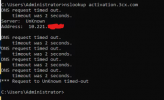
The above screen shot indicates a local network issue,

1. where the 3CX has incorrect DNS entries, Check the dns settings under network, maybe set them to 8.8.8.8 and 8.8.4.4

2. DNS queries from the 3CX are restricted on the firewall. Run nslookup , then type server 8.8.8.8 (this points to google dns server). do you get a ip address if you type activation.3cx.com
 
The above screen shot indicates a local network issue,

1. where the 3CX has incorrect DNS entries, Check the dns settings under network, maybe set them to 8.8.8.8 and 8.8.4.4

2. DNS queries from the 3CX are restricted on the firewall. Run nslookup , then type server 8.8.8.8 (this points to google dns server). do you get a ip address if you type activation.3cx.com
NSLOOKUPon my firewall appliance is going through, whereas when i do it from the server it is failing.
What could be the reason?
My primary DNS is 8.8.8.8
 
Would say the firewall is blocking DNS requests.

When you say primary DNS is 8.8.8.8 is this on the 3CX server network configuration.
 
Last edited:
  • Like
Reactions: vincent Kavila
Would say the firewall is blocking DNS requests.

When you say primary DNS is 8.8.8.8 is this on the 3CX server network configuration.
Hi Saqqara,

Please elaborate
 
What are the dns settings on the network card, if this pointing to external dns servers or local dns server (firewall or dns server)
 
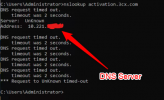
To add to what is being said, from your screenshot, if this was ran on the 3CX Server, it looks like the Primary DNS is not 8.8.8.8, but an internal IP address which is not answering to the DNS request:
1637051415387.png

Double-check that you have set the DNS Server to be 8.8.8.8, or at the very least, something that answers to the request.
If you server has multiple NICs, check that you have remove the DNS entries from any unused NICs and preferably also disable them if they are not being used.
 
Last edited:
  • Like
Reactions: vincent Kavila
To add to what is being said, from your screenshot, if this was ran on the 3CX Server, it looks like the Primary DNS is not 8.8.8.8, but an internal IP address which is not answering to the DNS request:
View attachment 25871

Double-check that you have set the DNS Server to be 8.8.8.8, or at the very least, something that answers to the request.
If you server has multiple NICs, check that you have remove the DNS entries from any unused NICs and preferably also disable them if they are not being used.
Hi, I managed to Disable all the inactive NIC cards and nslookup was successful.
However, the activation is still failing
 
Hi, I managed to Disable all the inactive NIC cards and nslookup was successful.
However, the activation is still failing
In a PM, send me the FQDN of the system that you are having a problem activating.
Also, does your Firewall have any kind of DPI feature enabled? If yes, try disabling it temporarily, or excluding activation.3cx.com, then try again.

Just to be sure though, when you go to Settings --> License, what exact error are you getting, still the same?
 
  • Like
Reactions: vincent Kavila
In a PM, send me the FQDN of the system that you are having a problem activating.
Also, does your Firewall have any kind of DPI feature enabled? If yes, try disabling it temporarily, or excluding activation.3cx.com, then try again.

Just to be sure though, when you go to Settings --> License, what exact error are you getting, still the same?
Where do i share the FQDN?
 
Hi @vincent Kavila,

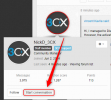
If you hover you mouse over NickD's icon, you'll see an option to start a conversation:

1637075697720.png
 
  • Like
Reactions: jed
@vincent Kavila
I still don't see any activation requests.

Check this:
  • Go to Settings --> License, and press the "Refresh" button, what exact error are you getting, still the same?
  • Does your Firewall have any kind of DPI feature enabled? If yes, try disabling it temporarily, or excluding activation.3cx.com, then try again. This could be responsible for blocking Activation Requests.
 
@vincent Kavila
I still don't see any activation requests.

Check this:
  • Go to Settings --> License, and press the "Refresh" button, what exact error are you getting, still the same?
  • Does your Firewall have any kind of DPI feature enabled? If yes, try disabling it temporarily, or excluding activation.3cx.com, then try again. This could be responsible for blocking Activation Requests.
Any updates?
 
Status
Not open for further replies.

Forum statistics

Threads
111,975
Messages
590,084
Members
164,901
Latest member
Silent_Guru