3CX failover behavior

Status
Not open for further replies.

DXC

Customer
Joined
Feb 15, 2021
Messages
62
Reaction score
4
Hi there,

We are facing a strange behavior with 3CX failover.
When I shut down the active server the services on the passive server don't start.
But when I power on the active server the passive server becomes the active one and all the services are started.

Do you have any ideas regarding this case?

Thanks.
 
Hi @DXC,

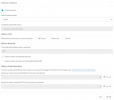
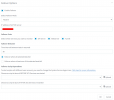
That is strange behavior indeed. Could you attach two screenshots with your settings for both the active and passive server from the Failover tab?
 
Attached.
 

Attachments

  • 3CX Phone System Management Console - Google Chrom.png
    3CX Phone System Management Console - Google Chrom.png
    41.9 KB · Views: 10
  • 3CX Phone System Management Console - Google Chrom.png
    3CX Phone System Management Console - Google Chrom.png
    40.5 KB · Views: 10
Hi @DXC,

Thank you for that. The set up looks good. Just confirming, the IP address is the LAN IP of the active server?

How long have you left the active server down? Can you test by giving it say 5 minutes, to make sure the passive server comes online as it should?
 
Yes, IP is the correct LAN IP of the active server.

The active server was shutting down at least for 10 minutes during tests.
I have made a several tests and the passive server becomes the active one after the active server power on again.

It looks like the passive server doesn't start if the active one is fully unreachable.
 
@DXC,

Can you repeat your tests but try and select each service one by one?
 
Hi,

It works when I select only "SIP Server" service to monitor.
 
Hi @DXC,

If Web Server (default port 5001) and Tunnel (default port 5090) aren't allowing failover to kick in, this sounds like it may be a network issue. The passive server tries to contact the active server using the ports 5001, 5060 and 5090. If 5060 is making it through, but the others aren't, you may need to investigate the traffic flow from the passive to the active server.

You could also try to add a whitelist in the IP Blacklist section, though if the address of the passive server is blocked, it should affect 5060 as well.

If you would like assistance along the way, I suggest contacting a 3CX Partner to assist and investigate further.
 
Status
Not open for further replies.