Solved 3CX forbidden to call external

Status
Not open for further replies.

networkchampion

Customer
Joined
Apr 11, 2022
Messages
7
Reaction score
1
Hi, since Friday afternoon 3CX will not allow anyone to call out.

This applies to users behind an SBC and users with 3CX app on their phone connected via 4G/5G... 3CX is hosted with 3CX directly, the instance has been restarted and all services are OK.

Incoming calls work fine but external do not work.
 
@networkchampion as a first step ensure your outbound rules are setup properly.
Also check in Dashboard >> Activity log, do you get any errors from your provider when you make outbound calls ?
From extension to extension can you call and all is ok ?
 
  • Like
Reactions: DimitrisL_3CX
@networkchampion as a first step ensure your outbound rules are setup properly.
Also check in Dashboard >> Activity log, do you get any errors from your provider when you make outbound calls ?
From extension to extension can you call and all is ok ?
Our system has been working fine since October 2021.

Activity log report shows the following when trying to call external (personal info removed)

Call or Registration to NUMBERHERE@(Ln.10000@SIPPROVIDER) has failed. IP ADDRESS HERE replied: 403 Forbidden; from IP:IPADDRESS HERE

extension > extension works fine.
 
@networkchampion as a first step ensure your outbound rules are setup properly.
Also check in Dashboard >> Activity log, do you get any errors from your provider when you make outbound calls ?
From extension to extension can you call and all is ok ?
Our SIP provider have just said this to us...

From our side it shows as the New Paid URI is not showing in the calls for outbound. Please see below link this may help with resolving the issue on the phone system.


https://www.voip-info.org/p-asserted-identity-and-remote-party-id-header/
 
@networkchampion this is someting specific for your provider and can be easily be changed to the Outbound Parameters of your SIP Trunk.
Is your Provider supported by 3CX ?


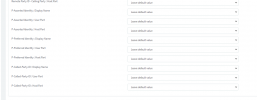
1649679855734.png
 
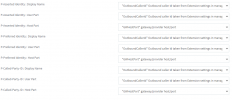
Resolved by setting the following from default...

not sure why we needed to make these changes when they have been set on default since we introduced 3CX in 2021.

1649680891758.png
 
@networkchampion this is something we cant answer unless if we know who your provider is.
If its a supported one then the templates would have been updated at the PBX side automatically.
Is your Provider supproted by 3CX ?
 
@networkchampion this is something we cant answer unless if we know who your provider is.
If its a supported one then the templates would have been updated at the PBX side automatically.
Is your Provider supproted by 3CX ?
Thanks but its been resolved by applying the settings above... sadly our provider is not on the supported list but the issue has now been resolved.
 
  • Like
Reactions: NikosT_3CX
Status
Not open for further replies.

Forum statistics

Threads
111,974
Messages
590,081
Members
164,899
Latest member
mazet