3CX/Grandstream - SIP/RTP Ports Local

Status
Not open for further replies.

pacpac

Forum User
Joined
Jan 12, 2012
Messages
87
Reaction score
1
Hi, I have 3CX installed on a Raspberry and have connected a Grandstream ATA (HT802) on the same LAN. In 3CX I have set the SIP port to 6060 and the RTP ports, as default to 9000-10999. In the Grandstream ATA GUI, I see Local SIP port and Local RTP port. Shall I set the same port numbers on the Grandstream as the 3CX, i.e. Local SIP port to 6060 and RTP port as any port inside 9000-10999, or something else? I am only using FXS Port 1. In case something else, should I forward those two port on the router to the Grandstream ATA IP? In the router I have forwarded all 3CX ports to the 3CX IP and the firewall checker is passed OK. Thanks.
 
  • Like
Reactions: Evolute IT
Thanks, I have configured/provisioned as suggested, can make outgoing and receive incoming. I note the SIP port is set back to 5060 and RTP back to 5004 on the Grandstream GUI. Shall I now forward those port to Grandstream's IP on the router?
 
You do not have to do anything on the router, as the 3CX and HT802 are all local (on same network)
 
What are you trying to do with the HT802 ?
 
I am connecting a Panasonic DECT phone to the HT802, and will use it as a VoIP handset.
 
Can you see the extension number registered in the 'Extension' page within 3CX management console ?

Has the Ht802 been provisioned correctly, can you access the HT802 frontend using the default username and password ?

Can you do a an echo test by dialling *777 on the phone - this will check network connection to the 3CX server
 
Last edited:
I can see the extension registered OK in 3CX, green dot. I cannot log in to the HT802 UI with default settings, but I can log in using 'admin' and the password set by 3CX under 'Device Web Page Password'. The echo test on *777 works fine.
 
I can see the extension registered OK in 3CX, green dot. I cannot log in to the HT802 UI with default settings, but I can log in using 'admin' and the password set by 3CX under 'Device Web Page Password'. The echo test on *777 works fine.

This is great, now to resolve your main issue - incoming and outgoing calls.
 
Do you have any other phones configured on the 3CX system ?. if so can

Can you make internal calls ? between this device and the dec phone ext.
Can you make outgoing calls from this device ?


What setup do you have for external calls - calls to the outside world.
 
Yes, I can call from the DECT phone to 3CX on my iPhone, both ways. Also, I receive incoming to the DECT phone and can call out. I am using Voxbeam as the trunk provider.
 
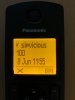
Also, when I had the ports forwarded on the router to the HT802, I received 2-3 calls from 'sipvicious' (this is not on my system anywhere)..., see attached. I cannot see this in the 3CX logs, stopped when I deleted the port forwarding. Thoughts?

IMG_0011.jpeg
 
  • Like
Reactions: pacpac
Thanks, very helpful
 
Status
Not open for further replies.

Forum statistics

Threads
111,952
Messages
589,895
Members
164,845
Latest member
tdzski5