- Joined
- May 13, 2016
- Messages
- 17
- Reaction score
- 4
I have a customer with 3CX Enterprise Hosted and about 50 handsets over 2 sites. I left the V20 upgrade until the last few days due to concerns the customer had. I did several upgrades prior to this and never had these sort of issues.
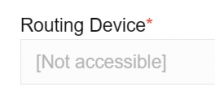
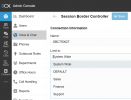
There are 3 SBCs on the primary site and a few Router phones as well . Since upgrading to V20 the Manager is unable to edit any exts. It complains about the lack of Routing device when the manager clicks on save. The dropdown box for the routing device in the managers browser presents no options to select a routing device. Its a good thing because the manager has no idea what a routing device is and which one to assign for what phone. This however makes it impossible to get past this impass and even do simple things like change a BLF key on someones phone or even a name/email on a ext which is what the manager was doing in V18 .
Its a mess frankly. One can edit and save exts from the system owners Admin browser access ok . This is currently the only way. We dont want the Manager to have this level of access as its already caused complications with the access at manager level.
The one thing that I have worked out is that if the phone is its own Router phone ie ext 114 is its own router phone then it is editable via the managers console. If the phone is routed via a SBC or another phone (Router phone) then it throws this error and complains that you dont have a routing device allocated.
All the SBCs and router phones were allocated and worked prior to the forced V20 upgrade . I dont know how to fix this and I suspect its a problem for 3CX to look at on their own platform if they are even interested.
This is a sizable system and worked fine on V18. The V20 upgrade has been a source of wasted time for me and anxiety as well as a disappointment for the customer.
On top of this Ive found that there are delays in the Incomming calls being answered after they pick the phone up and phones keep ringing in the ring group even though the call has been answered.
The customer often walks in and phones are and have been ringing for hours just to find that theres nobody there when you answer it. It seems the Invite packets get there to all members of the ring group but the Cancel packets dont allways which leaves phones ringing eternally. This is a new phenomina since the V20 upgrade as well.
Phones are a mixture of Fanvil X210 and X5U handsets. The install is just over 12 months old.
Tony
There are 3 SBCs on the primary site and a few Router phones as well . Since upgrading to V20 the Manager is unable to edit any exts. It complains about the lack of Routing device when the manager clicks on save. The dropdown box for the routing device in the managers browser presents no options to select a routing device. Its a good thing because the manager has no idea what a routing device is and which one to assign for what phone. This however makes it impossible to get past this impass and even do simple things like change a BLF key on someones phone or even a name/email on a ext which is what the manager was doing in V18 .
Its a mess frankly. One can edit and save exts from the system owners Admin browser access ok . This is currently the only way. We dont want the Manager to have this level of access as its already caused complications with the access at manager level.
The one thing that I have worked out is that if the phone is its own Router phone ie ext 114 is its own router phone then it is editable via the managers console. If the phone is routed via a SBC or another phone (Router phone) then it throws this error and complains that you dont have a routing device allocated.
All the SBCs and router phones were allocated and worked prior to the forced V20 upgrade . I dont know how to fix this and I suspect its a problem for 3CX to look at on their own platform if they are even interested.
This is a sizable system and worked fine on V18. The V20 upgrade has been a source of wasted time for me and anxiety as well as a disappointment for the customer.
On top of this Ive found that there are delays in the Incomming calls being answered after they pick the phone up and phones keep ringing in the ring group even though the call has been answered.
The customer often walks in and phones are and have been ringing for hours just to find that theres nobody there when you answer it. It seems the Invite packets get there to all members of the ring group but the Cancel packets dont allways which leaves phones ringing eternally. This is a new phenomina since the V20 upgrade as well.
Phones are a mixture of Fanvil X210 and X5U handsets. The install is just over 12 months old.
Tony