Solved DECT base station Yealink W60B will not register

Status
Not open for further replies.

KraGwort

Customer
Joined
Sep 21, 2026
Messages
14
Reaction score
0
We had a working W60B base station with 2 W53H phones. One of the phones dropped and became unregistered. Worked on it for a while with no luck. Then the base station itself dropped to unregistered. Worked on that for a while with no luck. Deleted the base station from the system, reset the base to factory and re-added as a new device/added the provision address given by the system etc.. Confirmed the firmware for both the base and the phones is the latest offered at Yealink. I just cannot get the base to do something it needs to do. This base and phones are still listed as active by 3cx. They are EOL at Yealink. Any suggestions?
 
I have not added phones to the base at this point. Adding phones to the base hasn't been the issue thus far however. The base has been unsuccessful registering ever since it dropped the connection back on 9/21.
 
I have not added phones to the base at this point. Adding phones to the base hasn't been the issue thus far however. The base has been unsuccessful registering ever since it dropped the connection back on 9/21.

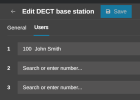
No not phones (as in portable handsets), I specifically said extensions:

1792397413329.png

If you added none, then the base will not register. This is normal behavior for W60B / W70B bases.

If you on the other hand did add some extensions, and they still don't register even though you see them populated in the base's web UI, then you need the help of your 3CX Partner as I mentioned earlier.
 
  • Like
Reactions: bitn2
Yes I did read that wrong. That little nugget of info was not conveyed anywhere in my reading. I did not add extensions to the base on initial install. The screen at the point of adding extensions specifically states, something along the lines of this can be done later. So I didn't add extensions figuring get the base online first, then add to it.

I will try this when on site next time. Now I am mildly optimistic but still would not explain why it failed in the first place with no changes being made.
 
Adding extensions was the solution. Thanks to all that replied. If any of you have influence with 3cx I would ask that this quirk be mentioned in the instructions or even better in the dialog box as the add process is happening on the admin console.

I am more of a one hurdle at a time person. Get the base talking to the system, then add extensions to the base, then link phones to the base. That was faulty obviously.

Thanks again.
 
Hi,

Glad to hear it was sorted in the end.

The Yealink guide already has you covered on step 5: https://www.3cx.com/sip-phones/yealink-dect-phones/

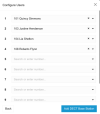
Assign your users and click “Add DECT / FXS”.
Assign users to your DECT through the 3CX Web Client

You will be able to assign more users after the set-up.


The general also has this covered here: https://www.3cx.com/docs/dect-phone-configuration/
  • Assign the users and click on “Add DECT Base Station”. You will be able to assign more users after the set-up.

We will put a note as you suggested to make it more clear.

As for why it stopped the first time, it's not easy to tell unless you troubleshoot it before resetting or changing settings.
If you run into a similar issue again start a new post and we can take it from there.
 
Status
Not open for further replies.

Forum statistics

Threads
112,286
Messages
591,717
Members
165,411
Latest member
Syedx91