Solved 3CX Hosting - Skyetel

Status
Not open for further replies.

plazticks

Free User
Joined
Jul 19, 2021
Messages
21
Reaction score
12
In reference to this post: https://www.3cx.com/community/threads/skyetel-no-longer-available-as-a-supported-sip-trunk.81716/

We currently host 3CX on our own server. Mulling over the idea of possibly switching over to have 3CX host it but found the post above. We use Skyetel, does this mean we cannot switch to 3CX hosted unless we change our trunk provider?

Also i believe the post stated that Skyetel was working on 3CX hosted compatibility. Is there a status on this or is it something that is no longer being worked on?

Thank you.
 
Hi @plazticks

The template for Skyetel will not be available in the hosted by 3CX solution however if you restore your backup the trunk settings will be restores as they are without the need for reconfiguring the trunk.
Not being supported and not working are different things but we currently do not support any IP based providers for Hosted by 3CX. The reason is because we manage the instances and the IPs and those could change at any time you will experience downtime as IP based trunks are locked to IPs.

Having said that we are working with Skyetel to support their authentication based trunk which will be supported with the Hosted by 3CX solution. We just began testing so I cannot provide an ETA but if we do not find any issues it will happen fairly soon.
 
  • Like
Reactions: plazticks
Got it. That answered my questions.

Thank you.
 
  • Like
Reactions: YiannisH_3CX
Glad I could assist
 
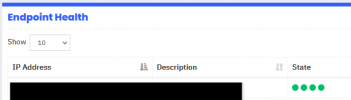
Welp. Tried this and all is not well. Migration succeeds. Backup loads. Can login and access. Everything green across the board, including Trunk but the Trunk refuses to send the call to 3CX. So phones are down. So if anyone else is trying this then it's not as simple as just restoring from the backup. There must be something else that needs to be done. Now we have no phones, and not sure how to go back to the server that was working.

Sad Face.
 
Last edited:
Did you update your Skyetel trunk with the new IP address?
 
  • Like
Reactions: plazticks
Yeah. Double checked and all showing green as well.

2021-07-29 22_33_24-Window.png
 
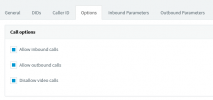
Ok. So not sure why this happened but apparently the trunk "Allow inbound" and "Allow outbound" checkboxes were un-checked during the migration. Effectively crippling the trunk. I double checked the old server and this was not an issue. So something with the migration unchecked those boxes.

2021-07-29 22_45_17-Window.png
07/29/2021 10:41:05 PM - [CM101011]: There's incoming call on the line '' marked as outbound-only!Lc:(@Skyetel[<sip************************])
07/29/2021 10:36:46 PM - [CM101011]: There's incoming call on the line '' marked as outbound-only!Lc:(@Skyetel[<sip:**************])
 
Last edited:
  • Like
Reactions: ChrisC_3CX
I've done a lot of backup and restores from on-prem/own cloud to 3CX hosted and I've never had that issue but glad you figured it out.
 
  • Like
Reactions: plazticks
Glad you figured it out!

I don't remember having seen this either, could it be that you accidentally pressed the "Disable All" button at some point?
1627635085848.png

That's what this does, it unchecks those 2 options.
 
  • Like
Reactions: plazticks
Glad you figured it out!

I don't remember having seen this either, could it bee that you accidentally pressed the "Disable All" button at some point?
View attachment 23264

That's what this does, it unchecks those 2 options.

You know what. That is exactly what I did. Right after the migration, when that error was popping up, I hit that button during troubleshooting, thinking maybe if I just disabled and re-enabled the trunk it would start working. Maybe I forgot to re-enable it or hitting enable all doesn’t re-check those boxes.

You hit the nail on the head sir. More often than I like to admit, the issue here was between the keyboard and the chair.

We’re back up and running now. Thanks for everyone’s quick responses and help.
 
Hi @plazticks

The template for Skyetel will not be available in the hosted by 3CX solution however if you restore your backup the trunk settings will be restores as they are without the need for reconfiguring the trunk.
Not being supported and not working are different things but we currently do not support any IP based providers for Hosted by 3CX. The reason is because we manage the instances and the IPs and those could change at any time you will experience downtime as IP based trunks are locked to IPs.

Having said that we are working with Skyetel to support their authentication based trunk which will be supported with the Hosted by 3CX solution. We just began testing so I cannot provide an ETA but if we do not find any issues it will happen fairly soon.


Wait a moment here. I just found this. Does this mean they are actually supported!?

“Skyetel is proud to be a preferred SIP Trunk Provider for 3CX, and fully supported by 3CX Hosted.”

https://support.skyetel.com/hc/en-us/articles/4402512215575-3CX-with-SIP-Registration
 
Last edited:
Ok. I am assuming this is extremely new. Doesn't look like the website isn't updated yet. This is however great news! Perfect timing. Awesome! Thanks!

1627681602405.png
 
Sorry my mistake, not currently supported when using 3cx hosted

In the process of being approved, see post #2
 
  • Like
Reactions: NickD_3CX
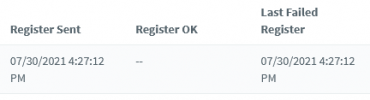
Ya. There is an article on Skyetels website saying that it is supported, with instructions on how to set it up but when i try the registration just fails. Skyetel shot me an email saying they have tested and other customers were successful in getting it working. So not sure why it's refusing. Should be straight forward. Chose Skyetel enter in credentials.. Maybe because i restored with the IP Based already in the system so something is stuck in the backend?

Deleted trunk, rebooted, re-added. Re-created SIP creds in Skyetel. Still no-go. Skyetel saying they are not receiving the authentication request from 3CX. Maybe i should just roll back to our on-prem server.


1627684078062.png
 
All is working now. Sheez. I guess there was a bug in the template in the version of 3CX we are using. Skyetel was able to resolve.

We are up and running again!
 
  • Like
Reactions: Evolute IT
All is working now. Sheez. I guess there was a bug in the template in the version of 3CX we are using. Skyetel was able to resolve.

We are up and running again!
Just to set the record straight, no, there is no bug in the current template for Skyetel in 3CX.
You are just using a template that is for a different type of Skyetel account (IP-based, even though SIP credentials are required).

As @Saqqara said, we are working towards adding support for this with Skyetel, but it has not been completed yet.

Anyhow, I'm glad your Trunk is up and running now! That's the important thing! :)
 
Status
Not open for further replies.

Forum statistics

Threads
112,313
Messages
591,838
Members
165,457
Latest member
devo.it