3CX Integration Error "Couldn't authenticate you" with Zendesk Using External Authentication (ADFS)

Status
Not open for further replies.

DEVNETTS

Premier Customer
Joined
Jul 22, 2020
Messages
42
Reaction score
14
We are attempting to use the 3CX's (V16) Zendesk integration. However, we get a "Couldn't authenticate you" error. Our Zendesk implementation is using AD integration via ADFS which redirects the agents to an ADFS login page to authenticate. I assume this is the reason for the error. Has anyone done this before and is there a way to modify copy the built-in Zendesk template and modify it to work?

Zendesk now supports Azure AD but it is also via a SAML method. Additionally, Zendesk supports JWT via an internal web site based on AD authentication. Has anyone used these methods of authenticating to Zendesk with the 3CX integration?

Started scenario with empty id
Request text: https://XXXXXXX.zendesk.com/api/v2/users/search.json?query=role:end-user phone:*762476
System.Exception: Server returned a non successful status code - HTTPStatusCode=Unauthorized - Reason=Unauthorized - Content={"error":"Couldn't authenticate you"}
at CrmIntegration.ScenarioProcessorBase.ProcessRequest(ScenarioRequest request, IValueManager customManager, HttpClient client, CancellationToken token)
at CrmIntegration.ScenarioProcessorBase.ProcessScenario(ProtocolScenario scenario, IValueManager customManager, CancellationToken token)
at CrmIntegration.ScenarioProcessorBase.Execute(ProtocolScenario scenario, CancellationToken token)
at CrmIntegration.CrmProcessor.GetContactInfoFromCrm(String contactNumber, String destinationEmail, Boolean createIfNotFound, CancellationToken token)
 
The method we are using is authenticating the users by email address against the ADFS. this creates the token that allows Zendesk to trust the user and identifies the user by email address. Where can I find the Zendesk template so we can possibly create a custom template?
 
Settings -> CRM Integration -> Choose "Zendesk" -> Show Template.

Then, copy that into a new XML file on your PC. Edit it using the CRM Template Generator for easier use.
 
I was unable to get the template to work with Zendesk set to either ADFS authentication against my internal AD or when using Azure AD authentication (synced with local AD). I was able to get results to return when testing a modified version of the template using an API key setup in Zen desk. however we do not get a popup when calls come in, and it is generating tickets with the subject "3CX PhoneSystem Call" for incoming and outgoing call with a time tracking of a < 30 seconds. additionally the contacts being populated in 3CX automatically (no action on my part) is limited to a dozen or so out of over 2,400. Perhaps I don't understand the proper implementation. Is there something preventing the 3CX web client from opening the zen contact page in the browser?

if working normally what should I see on my end users systems when they get a call form a listed contact? Will it open a separated browser window?
 
If Zendesk contacts are being added to the global phonebook, then the contact lookup is working. Contacts are added when they call you, or you call them, so they will be added with time.

If the popup is not being shown, you should check the following:
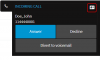
1) Do you see the contact card when you receive an inbound call as in the following screenshot?
1604961536593.png

2) Is your browser blocking popups?

3) Do you have the Web Client > Settings > Integration turned off?
 
I have confirmed that the popup blocker is off, and that the client side integration is set to off. I do not get the contact card. When calls come in they visible in the 3CX extension.

1604963131423.png
in the web client itself we don't see any popups
1604963352834.png
 
Thanks for the help. However I am still not getting the desired results. It is appears the contacts are being looked up and even getting updated. However I do not see the popup in the web client.

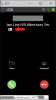
I am now seeing a small contact card in the 3CX extension. When I click on it it opens the Zendesk contact.

1604973728321.png

However I would like the call to automatically open the Zendesk in a browser tab.

Is there a way to have the automatically open the Zendesk link?
 
Last edited:
Sorry to keep updating the post so many times. I determined that there is an issue with the Edge or the Edge extension (I am using the new chromium based Edge). Either a permission issue or bug. I cant determine which. The permissions in Edge seem to match the Chrome permissions. I have even tried the Chrome extension in Edge (latest Edge allows for Chrome extensions).

Any thoughts?
 
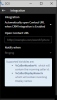
You mentioned that you have the integration set to Off in the Web Client, that will cause that the popup is not automatically launched. You need to select the second option "Automatically open Contact URL when CRM Integration is Enabled".

Also, the Chrome / Edge extension has another setting for this, you should check the extension settings as well to ensure that it has the integration enabled.
 
I incorrectly believed the extension had a "legacy" integration only setting. The settings are shown below. If you have the extension and the web client open which should be set to automatically open contact?

1605019423485.png

1605019440166.png
 
The Web Client and the Chrome Extension have independent settings. So, what you configure in the Web Client doesn't affect the Chrome Extension, and vice versa.

If you use the Web Client, you should configure the second option: "Automatically open Contact URL when CRM Integration is Enabled".

If you use the Chrome Extension, you should configure the second option as well: "Automatically open Contact URL when CRM Integration is Enabled".

Please note that if you have the Web Client AND the Chrome Extension running, and both are configured to open the Contact URL, you will get 2 pop ups.
 
After significant testing, we have determined that. ADFS authentication is not a factor in the process. I was able to create a modified version of the standard Zendesk CRM template by substituting the authentication with API based authentication. Easy enough.

If you have the extension loaded (chrome or new MS Edge) and the web client running with " Automatically open Contact URL when CRM Integration is Enabled" enabled but the same setting off in the extension the CRM window does not open. If you enable " Automatically open Contact URL when CRM Integration is Enabled" in the extension the CRM window opens regardless of the web client setting.

I believe this is due to the fact that the web client switches to controlling the extension when it is opened.

Some of the earlier issues were related to the number of digits for contacts and max digits and some other unexplained anomalous returns from Zendesk.

I would recommend a lot more documentation about how the integration works under the hood, and the interaction between the web client and the extension would be helpful.

A log of CRM calls and returns for diagnostics would be helpful as well.

Thank you for the help.
 
  • Like
Reactions: edossantos
Status
Not open for further replies.

Members Online Now

Forum statistics

Threads
111,842
Messages
589,320
Members
164,677
Latest member
skander