- Joined
- Aug 27, 2020
- Messages
- 16
- Reaction score
- 1
Hi,
We have integrated with CRM using this link
https://www.3cx.com/docs/bitrix24-crm-integration/
"If you're using the 3CX Chrome extension for click to call, and the Bitrix page still tries to send the call via their system, then you need to call their support, as they are generating a web page which has special links for phone numbers, instead of plain text, and then the 3CX Chrome extension can't change that text to links to call via 3CX...
I have asked above question to Bitrix24 tech team ,They replied
Please change "callto:" link format to desired
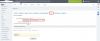
You change it to "custom format" and then configure it to whatever 3CX is asking for
I have asked bitrix tech "What i need to write here for connect 3cx "
You can contact 3CX and ask them what they want you to write there
That's why it's called "Custom"
Thanks in Advance.
We have integrated with CRM using this link
https://www.3cx.com/docs/bitrix24-crm-integration/
"If you're using the 3CX Chrome extension for click to call, and the Bitrix page still tries to send the call via their system, then you need to call their support, as they are generating a web page which has special links for phone numbers, instead of plain text, and then the 3CX Chrome extension can't change that text to links to call via 3CX...
I have asked above question to Bitrix24 tech team ,They replied
Please change "callto:" link format to desired
You change it to "custom format" and then configure it to whatever 3CX is asking for
I have asked bitrix tech "What i need to write here for connect 3cx "
You can contact 3CX and ask them what they want you to write there
That's why it's called "Custom"
Thanks in Advance.