3CX Integration with Zendesk assigning wrong tickets to staff members

Status
Not open for further replies.

nikosingh2007

Customer
Joined
Aug 19, 2022
Messages
2
Reaction score
0
Hi,

Since the new 3cx quality update, the staff members have been assigned wrong tickets.

For example, if Bob gets a inbound call from customer, after the call ends the ticket should be created for Bob. Instead, Alice gets the ticket created.

I have checked with Zendesk and everything seems fine from their side.

I reckon something broke during the new 3cx quality update. I also tried to do the CRM configuration for Zendesk on 3cx, still having the same issue.

It was working all fine before, till the 3cx update.

Could you have a look and advice me how can I fix this issue? or if I can install a new update which fixes this bug?

Thank You

Best Wishes

Niko Singh
 
Hi,

Make sure the template is up-to-date and that emails are all correct in Zendesk as 3CX now uses the agent email to match a user to a ticket.
 
Can I ask you more questions about the template?

How do I know if the template is updated?

How can I update the template? Via online or via file upload?

Thank You

Best Wishes
 
In the 3CX Console > Settings > CRM, there's a small collapsible tab above the drop-down and it usually says "All up-to-date" but it may say "Update available", and clicking on it will reveal the list.

If it's already up-to-date, then you'll need to check the Zendesk side.

Just to be sure, you're on v18 latest (18.0.4) ?
 
Hi,

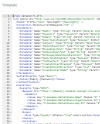
can you say a bit more about the templates, please? Is this to do with this template?
1660909937492.png

All emails are fine on both platforms as we use SSO so otherwise users wouldn't be able to login.

I can show example of the problem we're facing:

The call has been answered by user called Jamie:
1660910105298.png
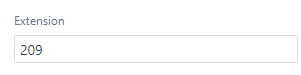
Zendesk received it as a call picked by different extension - 213 and not 209(the call duration is different but alright as it went through IVR first[808] and then by queue[918])
1660910222848.png
Jamie's extension is set correctly in zendesk:
1660910277541.png
and in 3cx his login email matches his zendesk email(Both systems SSO)

This only started following last update and zendesk started logging calls as received by random extension. For example the other call was, according to zendesk, picked up by ext 666 which doesn't exist anywhere in 3cx(queue, group, user). Majority of calls are logged right but it's about the ones that are aren't since these are being missed.
 
In the 3CX Console > Settings > CRM, there's a small collapsible tab above the drop-down and it usually says "All up-to-date" but it may say "Update available", and clicking on it will reveal the list.

If it's already up-to-date, then you'll need to check the Zendesk side.

Just to be sure, you're on v18 latest (18.0.4) ?
Yes, templates are fine:
1660910634553.png
This is the version:
1660910674053.png
 
Hi,

can you say a bit more about the templates, please? Is this to do with this template?
View attachment 31592

All emails are fine on both platforms as we use SSO so otherwise users wouldn't be able to login.

I can show example of the problem we're facing:

The call has been answered by user called Jamie:
View attachment 31593
Zendesk received it as a call picked by different extension - 213 and not 209(the call duration is different but alright as it went through IVR first[808] and then by queue[918])
View attachment 31594
Jamie's extension is set correctly in zendesk:
View attachment 31595
and in 3cx his login email matches his zendesk email(Both systems SSO)

This only started following last update and zendesk started logging calls as received by random extension. For example the other call was, according to zendesk, picked up by ext 666 which doesn't exist anywhere in 3cx(queue, group, user). Majority of calls are logged right but it's about the ones that are aren't since these are being missed.
This is strange. There was a bug before where it would log multiple tickets for the same call but this isn't it.

(The extension field in Zendesk isn't used anymore, only the email address.)

Does the queue have both 213 and 209 in it?
 
This is strange. There was a bug before where it would log multiple tickets for the same call but this isn't it.

(The extension field in Zendesk isn't used anymore, only the email address.)

Does the queue have both 213 and 209 in it?
Hi, yes. the queue has these numbers and a few more. Different team reported that it's happening to them as well inside of their queue. It might be that the ext numbers are getting mixed in each queue but not outside of them. So other queue for 301-311 numbers is not mixing with our queue that is for 201-215 but, as on the example, extensions are mixed inside.

I disabled the user field for the extension just now as you mentioned it's not in use by integration and we didn't use it for any other purposes.
 
Please be informed that we are aware of this issue and it has been already addressed.
 
  • Like
Reactions: Evolute IT
Please be informed that we are aware of this issue and it has been already addressed.
We are experiencing the same issue with Dynamics 365. Can you elaborate what you mean when you say "addressed"? Is a fix coming in update 5?
 
We are experiencing the same issue with Dynamics 365. Can you elaborate what you mean when you say "addressed"? Is a fix coming in update 5?
The fix will be included in Update 6 as far as I know.
 
  • Like
Reactions: TheodorosG_3CX
Just want to confirm that this isnt fixed yet. I saw that the following was in the changelog for Update 5 but I am still experiencing the issues.

https://www.3cx.com/blog/change-log/phone-system-change-log/
  • Fixed CRM Journaling via Q that was reporting the wrong extension to CRM.
The fix for this is included in Update 5. If you still have the issue, please open a support ticket so we can investigate further.
 
I have integration with Dynamics 365, but I am getting incorrect agent assignment for call records.
 
I have integration with Dynamics 365, but I am getting incorrect agent assignment for call records.
Are you using a queue with ring all strategy? Can you share with me the 3cxSystemService.log file in verbose mode after you reproduce the issue?
 
  • Like
Reactions: Evolute IT
I am using a queue but with Least Talk Time polling strategy. Issue is rare, ill have to enable verbose and keep an eye on it daily.
 
I am using a queue but with Least Talk Time polling strategy. Issue is rare, ill have to enable verbose and keep an eye on it daily.
Please do, and send me the ZIP file with the support information package once you reproduced it.
 
Status
Not open for further replies.