3CX iOS App Official Release Available for Download: A New Look and Faster!

Vali_3CX

Staff member
Joined
Dec 12, 2008
Messages
2,930
Reaction score
1,158

Improved functionality with a range of new features added.​

Our latest 3CX iOS App is now available in the App Store! Much faster and with a fresh new look, it comes with a number of both modern and useful features to help you easily manage multiple calls, whether on hold or incoming. You can navigate back and keep chatting, kno...
Continue reading the Original Blog Post.
 
Last edited by a moderator:
Hello,

Do you intend to work on a better integration with Carplay and Apple Watch? It's difficult to use voice alone to control 3CX in the car. Answering is fine, but calling is very difficult. And for the watch, I find it peculiar to receive chat or missed call notifications on the watch, but not the call notification.
 
@Richard.L
Yes, both Apple Watch and Car Play support are on our ToDo list, but not for the next release - that would focus on V18 Update 8 new features.
 
Hello,
is it possible to duplicate same feature on Android ?
 
We're trying to keep all our clients as much as possible the same, but not always is possible due to differences between operating systems. Also, depending on task difficulty, some features may be included earlier in a client than in another - for instance, iOS client implemented earlier support for Siri than Android one for Google Assistant, while Android client has support for watch while iOS client doesnt... yet.
 
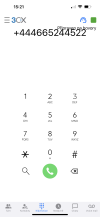
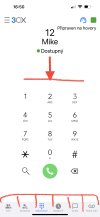
Why those numbers are not in the middle?
Nubers is too small. Its all wrong what did you do with the update :confused:IMG_8486.PNG
 
@Paccoo
Numbers are not in the middle because there are now three rows - number, name and status.
But we didn't encounter the overlap above during our beta/trial period - can you provide us the iPhone model so we could check?

EDIT: we found the overlap reason: the device has Text Size set to maximum - we'll address this, thanks for reporting.
 
Last edited:
@Paccoo
Numbers are not in the middle because there are now three rows - number, name and status.
But we didn't encounter the overlap above during our beta/trial period - can you provide us the iPhone model so we could check?
I know there are 3 lines, but with writing numbers it could be centered out- I have bigger text on because of my poor eye sight, and then it shows like that. Isn’t it possible to put in the center? I have iPhone 14 Pro Max. Dont tell me you cant center it out, to this point it was good and there was no problem with it.
 
The new version has a "Speed Dial widget"
It is clear how to add and remove speed dial numbers to it. But I can't figure out how to use it.
 
The new version has a "Speed Dial widget"
It is clear how to add and remove speed dial numbers to it. But I can't figure out how to use it.
It's a widget that you put on your desktop.
 
  • Like
Reactions: Vali_3CX and paurus
  • Like
Reactions: Paccoo
@Paccoo
We'll fix/improve it in the next release.
Thanks for reporting it!
 
  • Like
Reactions: Paccoo
@paurus
You also can add it also on Today menu so you can access it from locked screen if it's convenient.
 
  • Like
Reactions: paurus
@Paccoo
We'll fix/improve it in the next release.
Thanks for reporting it!
Thank you- Just move 3 lines down and it would be OK. The dial itself is also quite small. The whole thing is unaesthetic. The status bar (bar) is again at the very bottom and is also small.
 

Attachments

  • IMG_8488.jpeg
    IMG_8488.jpeg
    501 KB · Views: 19
  • Like
Reactions: Gasha and Vali_3CX
Since the new version a green call bar is shown on top of the screen (iPhone) for incoming calls.

This is problematic as the green bar hides the options on top of the 3CX screen...especially Call forwarding. It's not possible to choose a different status during an incoming call. There is no way to swipe the green bar or hide it any other way permanently. Hoping this can be solved in an upcoming version of 3CX. Thank you.
 
Thanks. I've read the thread. However, it's not during a call I need to access the Call Forwarding/Status options. It's whenever a new call comes in and there's a situation which prevents me from picking up I would like to change my Status to Away (for example). The call is then forwarded to my colleagues for pick up. I have no option to do so any more.

Hoping you can help. Much appreciated.
 
Last edited:
Hello

I have the impression that the Dutch translation for the app has somehow changed in one place and is now an 'incorrect' representation of the function that it has.

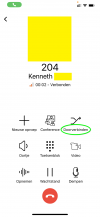
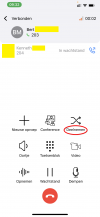
See attached images.

When I receive a call and want to forward it, it correctly says "Doorverbinden" (image 1).
Then, when I'm connected (I choose attended transfer) and want to forward the original caller to my coworker, suddenly the text says "Deelnemen" (image 2). This last text is incorrect, it should again be "Doorverbinden".

This has changed since the last update and I'm unsure why... It has caused confusion with some of our customersand I have received calls about this.

Greetings
Kenneth
 

Attachments

  • 1.png
    1.png
    114.7 KB · Views: 11
  • 2.png
    2.png
    125.9 KB · Views: 11
Thanks. I've read the thread. However, it's not during a call I need to access the Call Forwarding/Status options. It's whenever a new call comes in and there's a situation which prevents me from picking up I would like to change my Status to Away (for example). The call is then forwarded to my colleagues for pick up. I have no option to do so any more.

Hoping you can help. Much appreciated.

Still looking for any solution to our problem. It is very annoying to deal with. Maybe it will be fixed in upcoming upgrade? Anyone can shed some light?
 
Still looking for any solution to our problem. It is very annoying to deal with. Maybe it will be fixed in upcoming upgrade? Anyone can shed some light?
during an incoming call, you can press the power button twice. after that, the call will be forwarded to the "busy" status.
 
  • Like
Reactions: jed

Forum statistics

Threads
111,993
Messages
590,178
Members
164,933
Latest member
bunthoeun.may