Solved 3CX Live Chat Plugin Not Working

Status
Not open for further replies.

alxdso

Free User
Joined
Apr 3, 2024
Messages
5
Reaction score
2
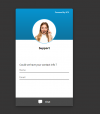
Hi, we recently moved our website to Bluehost and the Live Chat plugin stopped worked. It was working in our previous hosting, but not with Bluehost. The direct link (https://axuspbx.3cx.at:5001/LiveChat121821) of the live chat app does work, but when you view it on our website, it has a "do not sign" when you hover over the icon and the app is not functional. Please let me know if you need further information. Thank you.
 
I do not see any issue from here, can you share screenshots from your side and show us the problem?

1712115282987.png
 

Attachments

  • image.png
    image.png
    868.8 KB · Views: 6
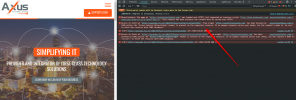
Please check the error on your website:
1712217356056.png
Have you also specified the url in http://www format?
 
When copying the HTML code, please ensure you have the 2nd and 35th lines pasted into your website code.

This is to ensure the PBX talk link and the callus.js are included in the code.
 
When copying the HTML code, please ensure you have the 2nd and 35th lines pasted into your website code.

This is to ensure the PBX talk link and the callus.js are included in the code.
Hi NicholasP, not sure which HTML code you need me to copy. We are running the website on a Wordpress platform. Can you please provide some instructions where to add the HTML code and the HTML to add? Thank you
 
If it is a Wordpress site, just ensure that in your PBX the URL is entire, with the https://www at the beginning. Your link above doesn't have the www but your site redirects to www at the beginning.

https://axustechnologies.com/ and https://www.axustechnologies.com/ are 2 totally different entries as far as the plugin is concerned.

HTML code is not required for Wordpress sites.
 
  • Like
Reactions: alxdso
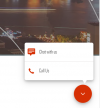
It seems that you fixed your issue, correct?
1712288388856.png
 
  • Like
Reactions: alxdso
It seems that you fixed your issue, correct?
View attachment 40663
Good morning! Yes indeed, it is now working. THANK YOU so much for the instructions on how to fix. On the PBX, we added the www and it worked like you said. You help is greatly appreciated.
 
Status
Not open for further replies.

Members Online Now

No members online now.

Forum statistics

Threads
111,831
Messages
589,277
Members
164,660
Latest member
RJenkinsROCK