3CX Meeting Reports did not coming last few days for some users.

ercanyd

Customer
Joined
Jun 2, 2023
Messages
9
Reaction score
0
hi.
meeting reports is not coming for some users from [email protected].

anyone experiencing same problem?
 
Hello,

What SMTP are you using, and what is your receiving mail service/server? Any relevant records in the PBX logs in verbose? Do test emails go? Have they checked SPAM folders, just in case?
 
Thank you for the quick response. Here is the additional information about my environment:

System Environment: I am running 3CX On-Premise on a Windows Server.
Current Version: v20.0.8.1121.

Mail Gateway Checks: I have monitored our mail gateway logs in detail. While missed call notifications and other system alerts are being delivered perfectly, there are no logs or connection attempts at all specifically for Meeting Reports.

Test Emails: SMTP test emails from the console are successful.

Since other notifications are working fine, the general SMTP configuration is functional. It seems the 3cx is not triggering or sending the meeting reports to the gateway.

Out of eight meetings held over a few days, only one email arrived; the emails from the other meetings were not received.
 
Hi,

Can you place the system in Verbose logging, have a short meeting and grab those logs? You can share them with direct message with me if you wish (upload to a file sharing service and give me the link), but do not post publicly anything that is not anonymised.
 
Hi,

Can you place the system in Verbose logging, have a short meeting and grab those logs? You can share them with direct message with me if you wish (upload to a file sharing service and give me the link), but do not post publicly anything that is not anonymised.
sent logs via direct message
 
Maybe your SMTP server doesnt like / is doing something with the mail - have you tested 3CX SMTP to see if they come through successfully?
 
Our current situation in our tests: A conference is held and recording begins. After the conference ends,
the conference information is sent via email, but the email does not contain a link to download the recording.
Normally, the download link would be included in the email.
What could be the problem?
 
First you said the emails arent coming.. so which is it?

they're not coming or they're not including links?
 
First of all, thank you for your interest.
When the post was opened, no emails were arriving.
As of today, emails have started arriving,
but they do not contain a link to download the meeting recording.
 
Can you try a test meeting using the lowest resolution for recording and see if it comes through.

what anti-spam filtering have you got? Could it be stripping the URLs.
 
  • Like
Reactions: NikosT_3CX
We held a five-minute test meeting and started recording.
At the end of the meeting, we received an email notification,
but it didn't contain a link to download the recording.
We use Fortimail, and the email doesn't go through any filters there.
When I checked the original email, it was just a blank email with meeting notification.
The email came from [email protected] without a link.
 
Change your SMTP server to 3CX and do a 15 second webinar and see what happens.
 
My server's SMTP settings are already working through my own email settings, but since the web meeting recording is being handled by 3cx cloud, the automatic email is being sent by 3cx.
 
Ok cool, lets see what Kyriacos comes back with once he's reviewed your logs.
 
Hi,

Just to mention - the logs were not showing any errors. Some suggestions were made to see if they help, but if they did not then a ticket will need to be opened for support to take a proper, detailed view at the issue.

A question, the emails with missing download links, were they for the new meetings, or was it delayed emails for the meetings held some days ago?
 
I never received emails for previous meetings.
The ones that arrived without links are for new meetings.
Emails have started arriving normally, but they don't contain download links.
 
For the sake of ruling out your anti-spam.

can you change your email on your extension to a personal one (like Gmail or something).

do a meeting again and see if it turns up.
 
@ercanyd please make a final test in order to eliminate some things.

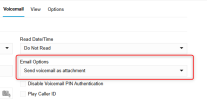
1) Send a Reset Password on the extension. Do you receive this ? If yes, all good.

2) Make a call to this extension and leave a Vmail. Have from before the below setup
to send the email and the vmail as an attachment to your emai.
Do you receive the email with the attachment or without it ?

Check and let us know.

1776930837927.png
 
In the last test, I bypassed the mail gateway and configured emails to go directly to the server.
Voicemail arrived with attached files.
A short meeting was held, recording started, but the result remained the same.
I received the standard meeting report email, but I didn't receive a link to download the recording.
 
@ercanyd please open a ticket with our Support Team so we can check this further.
 

Latest Posts

Forum statistics

Threads
112,283
Messages
591,681
Members
165,403
Latest member
saw-nick