Solved 3CX Mini PC hard drive

Status
Not open for further replies.

Mike-2408

Free User
Joined
Apr 10, 2022
Messages
28
Reaction score
1
I have installed the Linux 3CX Version 18 on my mini PC

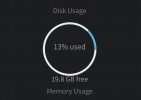
My hard drive size is 250GB but for some reason, now on my 3cx is showing 19.8GB free space.

I just installed my 3CX

How can i use my full space hard drive

Screenshot_20220414-235934_Samsung Internet.jpg
 
That should actually be whatever's detected on the OS level, what do you see if you connect to the machine and run:
 
That should actually be whatever's detected on the OS level, what do you see if you connect to the machine and run:
Filesystem Size Used Avail Use% Mounted on
udev 3.9G 0 3.9G 0% /dev
tmpfs 790M 8.9M 781M 2% /run
/dev/sda2 23G 1.9G 20G 9% /
tmpfs 3.9G 24K 3.9G 1% /dev/shm
tmpfs 5.0M 0 5.0M 0% /run/lock
tmpfs 3.9G 0 3.9G 0% /sys/fs/cgroup
/dev/sda5 1.9G 5.7M 1.7G 1% /tmp
/dev/sda6 199G 61M 189G 1% /home
/dev/sda3 9.2G 1014M 7.7G 12% /var
/dev/sda1 511M 3.3M 508M 1% /boot/efi
 
/dev/sda2 23G 1.9G 20G 9% /
As you can see on line 3, the root filesystem indeed has approximately 20GBs available so that is what is seen in 3CX as well.
 
As you can see on line 3, the root filesystem indeed has approximately 20GBs available so that is what is seen in 3CX as well.
I tried to configure the 3CX more than one time, most probably the space is gone with old installation this mini PC only dedicated to 3CX

How can i removed/delete everything else but keep existing 3cx files
 
I tried to configure the 3CX more than one time, most probably the space is gone with old installation this mini PC only dedicated to 3CX
Without re-installing the OS? Had you used the 3CX ISO? If not I strongly recommend you redeploy 3CX and the OS using our ISO this time: https://www.3cx.com/docs/manual/installing-debian-linux-pbx/

How can i removed/delete everything else but keep existing 3cx files
I'm not 100% sure I understand what you mean here, what would you want to delete? If you want to wipe the OS it would be better that you take a backup of 3CX, move it away from the machine, redeploy as mentioned above(using ISO), and restore the backup you took.

EDIT:

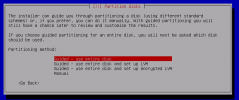
While installing the OS with the ISO do make sure that you select the first option when you see the following screen:
1650006603832.png
 
Last edited:
Without re-installing the OS? Had you used the 3CX ISO? If not I strongly recommend you redeploy 3CX and the OS using our ISO this time: https://www.3cx.com/docs/manual/installing-debian-linux-pbx/


I'm not 100% sure I understand what you mean here, what would you want to delete? If you want to wipe the OS it would be better that you take a backup of 3CX, move it away from the machine, redeploy as mentioned above(using ISO), and restore the backup you took.

EDIT:

While installing the OS with the ISO do make sure that you select the first option when you see the following screen:
View attachment 29536
This exactly what i have choose while the installing. i have created a bootable usb with the same steps mentioned here https://www.3cx.com/docs/manual/installing-debian-linux-pbx/

Is it possible to delete the other folders and keep the needed/latest 3cx only and avoid this re installation

I am asking how to delete the below unwanted folders:

/dev/sda5 1.9G 5.7M 1.7G 1% /tmp
/dev/sda6 199G 61M 189G 1% /home
/dev/sda3 9.2G 1014M 7.7G 12% /var
/dev/sda1 511M 3.3M 508M 1% /boot/efi
 
Is it possible to delete the other folders and keep the needed/latest 3cx only and avoid this re installation
If you mean remove the other partitions and then merge them into the main root filesystem then I'm afraid I cannot provide any information or assistance as this would be an OS specific operation, and frankly, I wouldn't even recommend looking into this if you're not sure either. It would be much faster and easier to simply re-install and restore a backup.

If you do want to go down the re-install path and you're absolutely sure that last time you had selected "User Entire Disk" but still ended up with these partitions, I suggest you look into removing them before re-deploying with the ISO though this again would be OS specific something for which we cannot really provide much information or or assist ance.
 
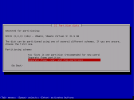
Mike did you use this option?

1650021155490.png

This would cause the home partition to take up the most space.

You should choose the 1st option: All files in one partition (recommended for new users)
 
  • Like
Reactions: ChrisC_3CX
Yes, i did use that option in my latest installation, I solved the problem by reinstalling the ISO from the beginning and removing all the partitions created earlier now I recovered all the lost desk space. thank you all for your support
 
  • Like
Reactions: ChrisC_3CX
You're very welcome!

Glad we could help!
 
Status
Not open for further replies.

Forum statistics

Threads
111,974
Messages
590,081
Members
164,899
Latest member
mazet