3CX mobile app not receiving calls after April 2025 Windows updates on the server

MyForumUsername

Premier Customer
Joined
May 16, 2023
Messages
6
Reaction score
0
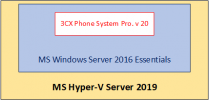
We have a fresh install of 3CX Phone System Professional v. 20 Update 5 running on MS Windows Server 2016 Essentials as a VM with 8 vCPUs and 16 GB RAM.

3CX was working fine with Yealink phones and 3CX mobile app v. 20.0.11.80 on iOS 18.

This month Windows updates were installed on the server successfully but after Windows restart, 3CX mobile apps stopped receiving calls. All 3CX services started successfully.

Has anyone seen this issue? What could be the cause of the problem?

We restored the VM to the state before the updates.

-- rpr.
 
Last edited:
Hello,

reading this, I am not sure what you mean exactly.
The 3CX is working on a Virtual Machine, so nothing did change there, just the base OS did have some update correct?
Or did you update the OS of the Virtual Machine where the 3CX server is installed? or both ?
 
I edited my post. The issue occurred after 2025-04 updates were installed on the Windows Server 2016:
1744810881547.png
 
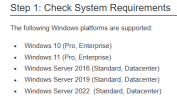
The 1st thing I see is that an Essentials server is being used. 3CX is supported only on Standard and Data Center editions

1744960059764.png

You may be better off just installing it on a linux VM. Just download the ISO and install it.
 
  • Like
Reactions: Evolute IT
The 1st thing I see is that an Essentials server is being used. 3CX is supported only on Standard and Data Center editions
The issue has been fixed after updating 3CX to ver. 20.0 Update 6 (Build 486 Alpha). After latest Windows Update (May 2025), everything works as before.
So, no the problem was not caused by running 3CX on MS Windows Server Essentials. (Whenever we report an issue with 3CX, the support people first say that we must not use Windows Server Essentials ...).
-- rpr.
 
The issue has been fixed after updating 3CX to ver. 20.0 Update 6 (Build 486 Alpha). After latest Windows Update (May 2025), everything works as before.
So, no the problem was not caused by running 3CX on MS Windows Server Essentials. (Whenever we report an issue with 3CX, the support people first say that we must not use Windows Server Essentials ...).
-- rpr.
Windows Server Essentials has other roles installed on it by default. This is not supported by 3CX. The PBX is supposed to be alone on a blank machine, not on a DC/File/DNS/DHCP server.
 
The issue has been fixed after updating 3CX to ver. 20.0 Update 6 (Build 486 Alpha). After latest Windows Update (May 2025), everything works as before.
So, no the problem was not caused by running 3CX on MS Windows Server Essentials. (Whenever we report an issue with 3CX, the support people first say that we must not use Windows Server Essentials ...).
-- rpr.
The requirements are there for a reason.

Windows Server Essentials has other roles installed on it by default. This is not supported by 3CX. The PBX is supposed to be alone on a blank machine, not on a DC/File/DNS/DHCP server.
This.
 
Windows Server Essentials has other roles installed on it by default. This is not supported by 3CX. The PBX is supposed to be alone on a blank machine, not on a DC/File/DNS/DHCP server.
I know that Windows Server Essentials has these other roles installed but in our case there are no PCs that connect to the DC for file sharing or anything. The server is used only for running 3CX Phone System Professional which means that these other services have minimal impact on the server performance. The Essentials edition was installed just because the license is cheaper than Standard edition and the Windows OS was chosen because the admins are not familiar with maintaining a Linux based OS.

Moreover, https://www.3cx.com/docs/manual/phone-system-installation-windows/ does not mention any services that may conflict with 3CX services. I conclude that using Windows Server Standard with AD, DNS, DHCP, file/print services is supported configuration for running 3CX, but it is effectively the same environment as the Windows Server Essentials, which is not supported officially.
-- rpr.
 
I know that Windows Server Essentials has these other roles installed but in our case there are no PCs that connect to the DC for file sharing or anything. The server is used only for running 3CX Phone System Professional which means that these other services have minimal impact on the server performance. The Essentials edition was installed just because the license is cheaper than Standard edition and the Windows OS was chosen because the admins are not familiar with maintaining a Linux based OS.

Moreover, https://www.3cx.com/docs/manual/phone-system-installation-windows/ does not mention any services that may conflict with 3CX services. I conclude that using Windows Server Standard with AD, DNS, DHCP, file/print services is supported configuration for running 3CX, but it is effectively the same environment as the Windows Server Essentials, which is not supported officially.
-- rpr.
I conclude that you should be using Linux in this case.

It's well-known that 3CX should run on a dedicated machine with nothing else. You assume that it should work because you want it to, but that's not how 3CX's support works. Essentials is not supported, period. Just like Windows 10/11 Home is not supported, only Pro and Enterprise.
 
  • Like
Reactions: NicholasP_3CX
AFAIK Essentials is only available via OEM manufacturers (preinstalled) now and can be virtualized only if it is also installed on the physical level (similar to Standard's two-VM license).

There's really no "Linux server administration" to do, I'd really reconsider that option. And Linux won't require an Enterprise level license from 3CX. One can still back up/snapshot the VM disk, or fall back to reinstall+restore.
 
  • Like
Reactions: Evolute IT
the Windows OS was chosen because the admins are not familiar with maintaining a Linux based OS.
I am one of the most linux challenged people out there, and I use Linux with 3CX wherever I can (except for demos because its easier to demonstrate on a Windows machine)

My advice to you is to have a good solid backup (we can do hourly backups) and if anything goes wrong with the Linux OS, just trash it and restore.

I personally dont even bother with troubleshooting OS issues. Just rebuild and restore.
 
  • Like
Reactions: Evolute IT

Latest Posts

Forum statistics

Threads
111,962
Messages
589,995
Members
164,867
Latest member
swegner