3CX mobile app push not working.

Masaki

Titanium Partner
Advanced Certified
Joined
Mar 23, 2020
Messages
60
Reaction score
8
Hi 3CX Support,

This day has alert from customers(more than one),they has problems , what happen about server push. Sometime work, switch fail. Please recheck.

Thank you,
 
Hello @Masaki,

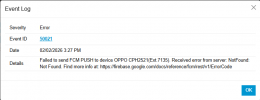
Do you see any errors in the Event logs related to PUSH?
 
Hello @Masaki,

Do you see any errors in the Event logs related to PUSH?
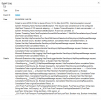
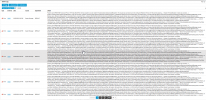
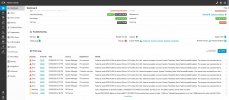
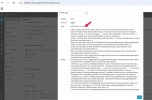
Yes, this is error has 50020-50021. I has restart service but not working. I think it has problem about connection or Server PUSH.

1770278305001.png
1770278451214.png
1770278415723.png
 
For the Android devices please make sure to follow our guide Android: Not getting your calls? and you have enabled the notifications for the 3CX App.

For the iOS device I can see that you have timeout.
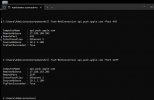
Please make sure that you can reach the below from the PBX server.
.push.apple.com
pbxservicespush.3cx.com, 443 (outbound, TCP, uninspected traffic)

See also and follow our guide Firewall & Router Configuration
 
  • Like
Reactions: TheodorosG_3CX
Dear 3CX Support Team,

We would like to inquire whether there were any changes or updates on the 3CX server today related to Push Notifications.

Currently, our customers who are using 3CX Version 20.0 Update 7 (Build 1080 Release) are experiencing intermittent issues with Push notifications on both iOS and Android devices.

The behavior observed is as follows:

  • During certain periods, Push notifications are delivered successfully.
  • During other periods, Push notifications do not work at all on both iOS and Android.
We have already verified the firewall configuration, and all required ports for Push notifications remain allowed and unchanged.

Could you please advise if there are any known issues, recent changes, or ongoing maintenance related to Push services that may cause this behavior?

Thank you in advance for your support.

Best regards,
 

Attachments

  • error push.jpg
    error push.jpg
    239.3 KB · Views: 17
  • error push1.jpg
    error push1.jpg
    209.5 KB · Views: 16
Dear 3CX Support Team,

We would like to inquire whether there were any changes or updates on the 3CX server today related to Push Notifications.

Currently, our customers who are using 3CX Version 20.0 Update 7 (Build 1080 Release) are experiencing intermittent issues with Push notifications on both iOS and Android devices.

The behavior observed is as follows:

  • During certain periods, Push notifications are delivered successfully.
  • During other periods, Push notifications do not work at all on both iOS and Android.
We have already verified the firewall configuration, and all required ports for Push notifications remain allowed and unchanged.

Could you please advise if there are any known issues, recent changes, or ongoing maintenance related to Push services that may cause this behavior?

Thank you in advance for your support.

Best regards,
The firewallcheck is red, did fixed this?
 
We have verified that the firewall allowed rules on the 3CX servers in use are configured correctly in accordance with the official documentation:
https://www.3cx.com/docs/manual/firewall-router-configuration/

The reason for contacting you is that multiple 3CX servers used by several customers are experiencing the same issue simultaneously on the same day, which makes it unlikely to be an isolated configuration or firewall-related problem on individual servers.

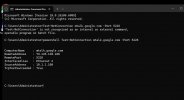
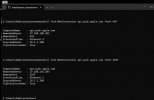
Additionally, we have checked the required push notification ports on the affected servers, and all results indicate that the ports are functioning normally.

Could you please advise if there have been any recent changes, incidents, or known issues on the 3CX push notification service or related infrastructure that could cause this behavior?

We would appreciate your clarification and guidance.
 

Attachments

  • Test push1.jpg
    Test push1.jpg
    53 KB · Views: 13
  • Test push2.jpg
    Test push2.jpg
    50.3 KB · Views: 12
So the firewallcheck is running green? Time of the pbx is synced?

EDIT: pbxservicespush.3cx.com is also reachable over tcp 443?
 
Are they all deployed in the same region, same ISPs? Could be a localised internet issue to which we might not have visibility.
 
Hi Kyriacos,

Since multiple 3CX servers located in the same region are experiencing intermittent push notification issues on both iOS and Android at the same time, and firewall configurations have already been verified according to the 3CX documentation, could you please advise on any recommended tests or verification steps we can perform to confirm whether this issue is related to a region-specific internet connectivity, routing, or CDN problem on the 3CX push infrastructure?
 
As mentioned above, checking reachability of pbxservicespush.3cx.com over tcp 443 would be a good starting point. A straight telnet might not be enough, a packet capture from one of the PBXs might reveal something more.
 
So the firewallcheck is running green? Time of the pbx is synced?

EDIT: pbxservicespush.3cx.com is also reachable over tcp 443?
Answer this questions please.
 
So the firewallcheck is running green? Time of the pbx is synced?
yes

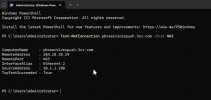
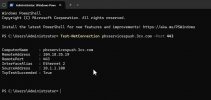
pbxservicespush.3cx.com is also reachable over tcp 443?
True
 

Attachments

  • True.jpg
    True.jpg
    41.8 KB · Views: 17
So the firewallcheck is running green? Time of the pbx is synced?
yes

pbxservicespush.3cx.com is also reachable over tcp 443?
True
Than i would start with a packet capture to verify everything works.
 
Hi Kyriacos,

The team has performed Windows updates and restarted the server, then conducted further testing.


Test results:
  • iOS: Push notifications are not working
  • Android: Push notifications are working normally


    Note
    Tested on 2–3 different 3CX servers and observed the same results.
 

Attachments

  • Test push2.jpg
    Test push2.jpg
    50.3 KB · Views: 13
  • True.jpg
    True.jpg
    41.8 KB · Views: 13
  • error push1.jpg
    error push1.jpg
    219.9 KB · Views: 13
Hi Kyriacos,
We would appreciate your assistance in checking the status of the 3CX Push infrastructure and CDN on the 3CX side.
If the issue is identified as being related to routing or specific Cloudflare edge paths, we kindly ask for your coordination with the upstream provider and confirmation that this is not an issue caused by the customer’s local configuration.
 
Hello,

We have no issues flagged with our systems - to initiate a deeper investigation please open a ticket with support.
 
KyriacosS_3CX
Hi 3CX Support,

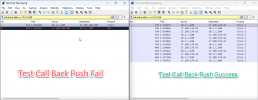
I testing keep pcap beterween Push success & Push fail.

This server OS Windows Server 2025 STD (Up todate)
3CX Version 20.0.7.1080
Problem Start : 05-02-2026


Why 3cx can send TLS V.1? if send tls v1 APNS apple has reject tls 1.0 and Solved to PUSH Fail.
*This log keep same server.
1770358768400.png
 
Hi @Masaki

Can you CAREFULLY try this from the 3CX machine (haven't had time to test this):

Code:
# Create the registry keys
$registryPath = "HKLM:\SYSTEM\CurrentControlSet\Control\SecurityProviders\SCHANNEL\Protocols\TLS 1.0\Client"

if (!(Test-Path $registryPath)) {
    New-Item -Path $registryPath -Force
}

# Disable TLS 1.0 for outbound client connections
New-ItemProperty -Path $registryPath -Name "Enabled" -Value 0 -PropertyType DWORD -Force
New-ItemProperty -Path $registryPath -Name "DisabledByDefault" -Value 1 -PropertyType DWORD -Force

Please do whatever necessary to backup registry (and possibly the whole machine) if/as necessary.

You might need to reboot before these settings kick in...

Does this help?
 
Last edited:
Hi again. I've actually tested this, and it does indeed work as expected in my environment.

I wish to reiterate that making changes to the Windows Registry should be done carefully. Serious problems might occur if you modify the registry incorrectly. For added protection, back up the registry and/or the machine before you modify it. You are the one ultimately responsible for the stability of your systems.
 
  • Like
Reactions: KyriacosS_3CX

Forum statistics

Threads
111,972
Messages
590,065
Members
164,886
Latest member
784