3CX MSIX App – Expired Code Signing Certificate since 29.03.2026

Chrisss

Premier Customer
Joined
Mar 30, 2026
Messages
6
Reaction score
0
Hi everyone,

we are currently experiencing an issue with the **3CX Desktop App (MSIX)** that started today across all of our systems.

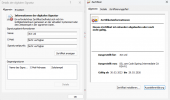
The MSIX package is signed with a **code signing certificate that has expired**:

* Publisher: 3CX Ltd
* Issuer: SSL.com Code Signing Intermediate CA RSA R1
* Validity: **30.03.2023 – 29.03.2026**
1774857368852.png

We are deploying the app via SCCM using the official download URL:
https://downloads-global.3cx.com/downloads/3cxsoftphone/3CX.msix

The package available at this URL is also affected and contains the expired certificate.

The AppLocker blocks the app immediately after certificate expiration...

Best regards,
Chris
 
  • Sad
Reactions: sir116
Same issue here.
 
  • Like
Reactions: slynet-bla
Hi,

We have achieved a workaround while this issue persists, we have extracted version 20.0.1096.0 MSIx from the windows store, which contains a valid certificate.

We ran this command first in Powershell (Admin)

Add-AppxProvisionedPackage -PackagePath "C:\users\Username\documents\3cx.msix" -Online -SkipLicense

Then installed the MSIX, now have a working 3cx app.

Hope this helps.
 
Hi,

We have achieved a workaround while this issue persists, we have extracted version 20.0.1096.0 MSIx from the windows store, which contains a valid certificate.

We ran this command first in Powershell (Admin)

Add-AppxProvisionedPackage -PackagePath "C:\users\Username\documents\3cx.msix" -Online -SkipLicense

Then installed the MSIX, now have a working 3cx app.

Hope this helps.
The only issue with this, if your environment uses the 3cx.com downloadable MSIX package and then install the one from the Windows Store, you will have 2 instances, you have to keep to the same deployment source it seems (if you manually install through the store, this is fine). Why there is a difference between the 2 packages baffles me.
 
  • Like
Reactions: BHI IT
Can someone from 3CX please let us know what is going on, even if it is "broken" so we can plan and update our customers. Has anyone heard from support about this yet?
 
We would like to inform you that a new version of the Softphone application (MSIX) has been released and is now available for download via the Partner Portal.

Please note that this version is not supported on Windows 10, as the operating system is end-of-life.
 
Last edited:
We would like to inform you that a new version of the Softphone application (MSIX) has been released and is now available for download via the Partner Portal.

Please note that this version is not supported on Windows 10, as the operating system is approaching end-of-life.
Thanks

1775667354636.png
 
Hi all

I'm still having issues with the latest posted version in the partner portal on Server 2019 (RDS)

error 8007000B: The app manifest publisher name (CN=3CX Ltd, O=3CX
Ltd, L=Egkomi, C=CY) must match the subject name of the signing certificate (CN=3CX LTD, O=3CX
LTD, L=Nicosia, C=CY, SERIALNUMBER=HE 173409, OID.2.5.4.15=Private Organization,
OID.1.3.6.1.4.1.311.60.2.1.3=CY).


I tested the extracted windows store version above on a test server and didn't get an error.
 
We are working on it, hopefully its a matter of days. Its some bureaucracy around the renewal of the certificate.
 
Last edited:
Hi All,

Our script which uses the MSIX ran fine yesterday after it was confirmed fixed by Charles.

2026-04-08 18:00:44 [INFO] === 3CX Desktop App MSIX install started ===
2026-04-08 18:00:44 [INFO] Running as: NT AUTHORITY\SYSTEM
2026-04-08 18:00:44 [INFO] Downloading MSIX from: https://downloads-global.3cx.com/downloads/3cxsoftphone/3CX.msix
2026-04-08 18:04:08 [INFO] Download complete: 126.3 MB
2026-04-08 18:04:08 [INFO] SYSTEM context detected provisioning MSIX for all users
2026-04-08 18:04:18 [INFO] Provisioning completed.
2026-04-08 18:04:18 [INFO] SYSTEM mode: MSIX provisioned. Users will receive it on next login.
2026-04-08 18:04:18 [INFO] Cleaned up downloaded MSIX
2026-04-08 18:04:18 [INFO] === 3CX Desktop App MSIX install finished successfully ===
 
Hi all

I'm still having issues with the latest posted version in the partner portal on Server 2019 (RDS)

error 8007000B: The app manifest publisher name (CN=3CX Ltd, O=3CX
Ltd, L=Egkomi, C=CY) must match the subject name of the signing certificate (CN=3CX LTD, O=3CX
LTD, L=Nicosia, C=CY, SERIALNUMBER=HE 173409, OID.2.5.4.15=Private Organization,
OID.1.3.6.1.4.1.311.60.2.1.3=CY).


I tested the extracted windows store version above on a test server and didn't get an error.
Any news regarding this?
 
Di
Any news regarding this?
Have you removed the app from the machine before trying to download and reinstall the new version?
 
  • Like
Reactions: Evolute IT
Hi @Charles_3CX

I'm still having issues on brand new installs. I can open the manifest.xml file and can see the error

The manifest is:
(CN=3CX Ltd, O=3CX Ltd, L=Egkomi, C=CY)

The Signing Cert is:
(CN=3CX LTD, O=3CX LTD, L=Nicosia, C=CY


I can't get around this error:

error 8007000B: The app manifest publisher name (CN=3CX Ltd, O=3CX
Ltd, L=Egkomi, C=CY) must match the subject name of the signing certificate (CN=3CX LTD, O=3CX
LTD, L=Nicosia, C=CY, SERIALNUMBER=HE 173409, OID.2.5.4.15=Private Organization,
OID.1.3.6.1.4.1.311.60.2.1.3=CY).
 
Hi All,

Can you recheck the latest? Make sure you are not using a file you already had. Version 5.5 (Build 1102)
 
Please check the latest version - Version 5.5 (Build 1102) - available in the portal.
 
I've downloaded 1102 and that works.

Thanks
 
  • Like
Reactions: KyriacosS_3CX
Can also confirm that it works with the newest version. Thanks!
 
  • Like
Reactions: KyriacosS_3CX

Forum statistics

Threads
112,069
Messages
590,611
Members
165,024
Latest member
JLDSP