Solved 3CX not adding an identifier to inbound calls despite Inbound Rule

Status
Not open for further replies.

3pbxuser

SOHO User
Joined
Jun 8, 2023
Messages
3
Reaction score
1
Anyone seen this before?

We have ported our main inbound number to a different trunk provider.

Since doing this, 3CX is not tagging calls to that number in the Call Log.

Hard to explain this, so annotated screenshots attached here.

Of course both trunks had the same DDI (because the number was ported) and they co-existed briefly (new provider allowed registration ahead of port for seamless switchover).

Have I hit some bug in 3CX caused by the duplicate DDIs? Or is there something I can do to fix this?

The old trunk provider has now been removed from 3CX completely, but the problem remains.
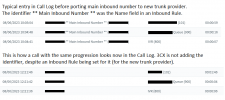
identifier not being added to calls.png
 
Hello @3pbxuser

The calls are most likely not matching the inbound rules you set. Change the destination to one of those inbound rules and call the number. Does the call go to the new destination?
Also when the phone rings do you see the Inbound rule name?
 
Hello @YiannisH_3CX

Thanks for the reply.

The calls are getting to the right destination because I've got the "Route To" set with the same info as the Inbound DID Rule, but for whatever reason the rule doesn't match, even though it's identical to the old rule.

I have a hunch it is something to do with the DID being identical to the old trunk and to them briefly co-existing.

Now the rule is just a DID rule and there's (now) only one trunk with this DID since the other trunk has been deleted now. The DID rule shows the right number and the right trunk but doesn't match.

I did a bit of testing by creating another DID Inbound Rule for a backup trunk we have. We don't normally take inbound calls on that number but when I put an inbound DID rule in for it, it did match as expected.

Then finally I found a workaround by creating a CID rule for call ID = * and trunk = the one I want, and that is matching. Do you forsee any problems using that technique?

When I get a chance I will try deleting the Inbound DID rule (plus my new CID workaround rule), deleting the new trunk altogether, then adding them back one by one and see if that fixes it.
 
Rule, but for whatever reason the rule doesn't match, even though it's identical to the old rule.

I have a hunch it is something to do with the DID being identical to the old trunk and to them briefly co-existing.
Since the numbers were ported to a different provider then perhaps the new provider is using a new number format and you should adjust to that. You can set the logging level in the activity log to verbose and see an Invite from the provider and what number format he is using.

Then finally I found a workaround by creating a CID rule for call ID = * and trunk = the one I want, and that is matching. Do you forsee any problems using that technique?
This will match all calls arriving at the PBX no matter what the caller is and route them to the same destination. If you add more DIDs down the line this will cause issues since everything will match this rule. Also if you receive any unwanted calls to whatever number this rule will also send them to the same destination.
I would not use this personally but it will work as long as you have only one number and one inbound destination.
 
  • Like
Reactions: 3pbxuser
Briliant, sorted. Thank you Yiannis, the verbose logging did the trick.

Old provider must have been sending the number formatted as if dialled from within country.

I can see from the logging the new provider is sending it in international format, prepended with a plus symbol and the country code, and with the leading zero omitted.

Once I updated the trunk settings to match the new format I was able to delete the CID rule, recreate the original DID rule, and now it all works as expected.
 
  • Like
Reactions: YiannisH_3CX
Status
Not open for further replies.

Forum statistics

Threads
111,974
Messages
590,081
Members
164,899
Latest member
mazet