Solved 3cx not going into night mode or day mode

Status
Not open for further replies.

Chan

Customer
Basic Certified
Joined
Jul 1, 2020
Messages
7
Reaction score
1
Hi,

Looking for help as to why my clients 3cx won't switch night mode (*642) after the most recent update. I have attempted *642 from multiple extensions and I set up time conditions for the inbound rule and those aren't working as well.
 
If you use short code to force in or out complete PBX follow IN or OUT behavior no matter what are the time settings for normal use.
if you dial *64 what do you hear ? is the PBX actually in normal, or forced IN / OUT state ?
 
The time settings are for normal use and calls are still coming in before or after the hours designated.

If I dial *64 it says "3cx phone system is using the default office hours." The PBX is in normal.
 
Ok so if in normal mode then this is your usual settings which are used .

if you want to force in night mode you need to dial *642 and of course you need to have set a night IVR with a message otherwise nothing will happens

If usual OOH is set with same forwarding route than OH then forcing with dial code change nothing
 
Last edited:
I'll try setting a new night IVR (currently we have the general one that is automatically set up within 3cx). I still don't understand why my Office Hours aren't working at all though.
 
In your SIP trunk and inbound rules check that you havent got this option configured:

1593681035309.png

Global hours are set from settings > Date & Time

Make sure PBX is set to use default office hours with shortcodes mentioned above.
 
Hi Chan,

For the Office hours to work you need to ensure the system is set to Default Office hours via the dial code. Forcing it In/Out will negate those hours.

Once you set the hours from the Settings > Timezone & Office Hours section, you will have to check the following:

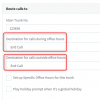
- In your SIP trunks you need to decide where the calls go during/outside those hours
1593683339777.png

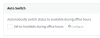
- In your individual extensions forwarding rules you need to decide whether you wish to use auto-switching (optional)
1593683385675.png

Then you simply wait for the right time to come, and the actions above will take place.
Do make sure that you have the right time zone set (if using a windows server you must set it in windows too). It goes without saying that the server clock must also match your area.
 
Hi Chan,

For the Office hours to work you need to ensure the system is set to Default Office hours via the dial code. Forcing it In/Out will negate those hours.

Once you set the hours from the Settings > Timezone & Office Hours section, you will have to check the following:

- In your SIP trunks you need to decide where the calls go during/outside those hours
View attachment 16791

- In your individual extensions forwarding rules you need to decide whether you wish to use auto-switching (optional)
View attachment 16792

Then you simply wait for the right time to come, and the actions above will take place.
Do make sure that you have the right time zone set (if using a windows server you must set it in windows too). It goes without saying that the server clock must also match your area.


Thanks! this fixed it :) I had not put a valid option for destination for calls during OOH.
 
Glad to hear Chan!
 
Status
Not open for further replies.

Latest Posts

Forum statistics

Threads
111,953
Messages
589,915
Members
164,851
Latest member
DrunkeMeister