3cx office hours issue

surenr

Customer
Joined
Apr 1, 2019
Messages
56
Reaction score
10
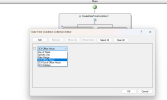
CFD app below condition do you know where to change value it picks from ? example 3cx office hours actual time
1792034496539.png

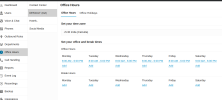
above is not picking from below setting
1792034610770.png
in addtion to above there used to be another location where you can set the 3cx office hours i remember that but in Current UI its not there and CFD is checking that setting instead of the new office hour setting . so kindly let me know how to fix it ?

either have to make CFD app dateTimeConditionalComponent to look at new 3cx office hours but dont know what department it will pick ? if not how to make it pick the correct department time ?

or let me know where is the old 3cx office hours setting to change ? im unable to find it in current UI

thanks in advance
 
Have you also checked the guideline here ?
 
Have you also checked the guideline here ?
yes, even it says same both options pick value from global office hours settings which is missing in the 3cx settings now ? or kindly share a screenshot showing me where it is or tell me where can i find that ?

below screen is from the docs and in the past that gobal office hour setting used to be in separate place
1792036165971.png
 
Will this only be a time based call routing with the CFD?
 
Will this only be a time based call routing with the CFD?
yes this is old app which has been working fine , issue is now i need to change office hours and for that im unable to find the setting.

as you can see from 3cx official doc it says global office hours gone but CFD condition is still using that and not allowing us to pick a department and its office hours !

after below change only this issue
https://www.3cx.com/blog/releases/v20-final/
1792037045658.png
 
Just to clarify this is an old CFD project(implemented in V18 CFD installer) and now you open it with the latest V20 CFD and need to adjust it?
If this is the case then you simply need to build it with the latest CFD to apply the Default office hours. I would also suggest to try the 3CX Call Processing scripts which are ready to build directly from the PBX as per below:
• https://www.3cx.com/docs/intercept-call-example/
 
Just to clarify this is an old CFD project(implemented in V18 CFD installer) and now you open it with the latest V20 CFD and need to adjust it?
If this is the case then you simply need to build it with the latest CFD to apply the Default office hours. I would also suggest to try the 3CX Call Processing scripts which are ready to build directly from the PBX as per below:
• https://www.3cx.com/docs/intercept-call-example/

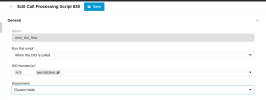
it was already compiled with v20 CFD, issue from as shown below screenshot for a call script if department is selected as system wide then its picking the old global office hours (which we cant change now bcs that setting is removed in UI)
1792038915061.png
 
If this is selected based on DID you can set Department but if this is System Wide in the script below you can add specific office hours.
 
If this is selected based on DID you can set Department but if this is System Wide in the script below you can add specific office hours.

i didnt use https://www.3cx.com/docs/intercept-call-example/ its code i have to edit and it does one thing but CFD CreateDateTimeCondition component im using currently allows me to do more like i can give office hours one ext. and out office hours another ext and build more complex call script with all the components
 
coming to the point there is genuine broken feature here global office hours is gone with v20 but when system wide option is selected 3cx is using that global hours value in 3cx so even in script i override it like you say if global hours is outside the value im giving in script like you say 3cx will check the global hour value first and then only script hour value. i think its worth a 3cx developer code review
 
In V20 the office hours apply to the department therefore the CFD must have an assigned Department.
 

Latest Posts

Forum statistics

Threads
112,250
Messages
591,499
Members
165,348
Latest member
Empire IT