3CX On Premise V20 DECT Gigaset & Snom extensions occupied

Alle CTEC

Silver Partner
Advanced Certified
Joined
Sep 11, 2023
Messages
360
Reaction score
45
I'm having a problem that initially only occurred on Snom DECT systems, but then it also occurred on the Gigaset 870 IP Pro. Both systems are updated to the latest firmware versions. Suddenly, users who have associated both a phone and a DECT device appear to be busy. I've noticed that the problem doesn't occur on systems with older SNOM and Gigaset firmware versions.
 
Regarding the Gigaset N870 IP Pro, is it running the latest firmware provided by Gigaset, version 2.67.0?

For the Snom DECT devices, could you please specify the exact models and the firmware versions currently installed?

Additionally, if a user extension is assigned only to a DECT device, does the extension appear as Busy from the PBX perspective while the user is on a call? Or is the call received correctly in that case?
 
Hi, thank you very much for your interest.

Gigaset N870 IP PRO V2.67.0 (V2.67.0+build.c923ac6)
IPDECT-V2 (M900) IPDECT-V2/07.60/B0401/06-Ott-2025 09:58 Phone M25 Firmware760.400

So on Snom on the 3CX side you don't see any registered phones, I removed the cordless from users who also have a landline and it seems to no longer occur. The problem on Gigaset only occurs on extensions that have a landline and DECT and it is sufficient to turn off the DECT and the extension can use the landline. I noticed that the SNOM systems I have are all updated but the one that has the problem is the only multicell one, while on Gigaset, which I have many but with versions 2.6.1, the one I updated to 2.6.5 gave me the problem I installed 2.6.7 nothing doing.
 
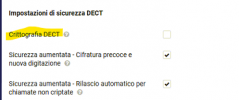
Hi, I disabled the encrypted channel on Gigaset 870 IP PRO and the problem seems to have been solved.
 
Hi,

So you mean you've enabled SRTP on the base and it was dropping the calls because they were arriving as plain RTP?

That's a classic gotcha. SRTP is good but you need to enforce it on all the sides (which is not always possible).

When calls arrive that are not encrypted, the device is forced to drop them (since the requested level of security cannot be enforced) and usually this is done by appearing "busy".
 
This options

1769674193398.png

Tank you
 
These settings are under System > DECT and appear to be on by default on a freshly . In my case I did not have any issues with dropped calls and did not need to disable them.

First thing I would do is upgrade my handsets, and base, then factory reset and reprovision to ensure everything is aligned.

If you still have problems though, this is a question for Gigaset Support. I would recommend to contact them directly in that case.

Note: I am using V2.66, the previous stable. 2.67 was released by Gigaset on January 2026.
 
On the advice of a colleague who had already had problems in the past, he contacted Gigaset who recommended removing the option, and in fact there were no problems with the removal.
 
  • Like
Reactions: JohnS_3CX
There you have it. In your case, you may have a combination of handset / repeater or other condition that makes the encryption unreliable and this causes the base to drop the call since security cannot be guaranteed.

But to be certain, for specifics you will need to speak with Gigaset to learn what / why causes calls to be dropped. Might be worth opening a case with them so you can keep the security enabled if possible. Maybe you need to replace / update some hardware.
 

Latest Posts

Forum statistics

Threads
111,953
Messages
589,915
Members
164,850
Latest member
masvty