3cx outlook plug-in doesnt work

Status
Not open for further replies.

Bogdan

Joined
Jul 21, 2011
Messages
10
Reaction score
0
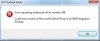
getting the attached error, "Could not connect to Microsoft Outlook Plug-in at CRM Integration module" when I try to call a contact with 3CX.
Myphone/3cx desktop client is working fine and I can see the plug-in enabled in Outlook.
My first instinct is to install the CRM integration module but do I need to (and where is...)?
Am I missing something obvious?
Im running win 7 x64 with Outlook 2010 x86 and 3cx is v10 sp2
 

Attachments

  • 3cx plugin error.JPG
    3cx plugin error.JPG
    21.9 KB · Views: 931
have you installed the desktop components?
 
yes
 

Attachments

  • 3cx.JPG
    3cx.JPG
    12.6 KB · Views: 917
I'm having the same issue with Outlook 2003.

Everything works fine, it pops up, seacrhes the outlook contact lists etc, but if I try and open a contact and dial by using the buttons at the top that 3cx puts in, I get "could not connect to microsoft outlook plugin at crm integration module"

If I make the user a local admin, it works no problem at all! I cannot use this as a solution, we need to maintain control over our user permissions etc on the machines. I have tried modifying permissions on a folder by folder basis, c:\Program Files\3CX Assistant, c:\Program Files\Common Files\Microsoft Shared\VSTO, c:\Program Files\Common Files\Microsoft Shared, c:\Program Files\Microsoft Office... then I came across... c:\Documents and Settings\All Users\Application Data\3CX Assistant CRM Integration

I gave machine users full access to this folder, it contains a file called TAPI Service Provider.ini, and hey presto it now works no problem. I'm about to test this on a few more users machines and see what happens.

I hope this may help anyone that may have the same problem.
 
Status
Not open for further replies.

Members Online Now

Forum statistics

Threads
111,860
Messages
589,437
Members
164,700
Latest member
Apollo Cloud
