Solved 3CX PBX - problem with RTP

Status
Not open for further replies.

jdrexler

Customer
Joined
Feb 22, 2019
Messages
3
Reaction score
1
Hello,
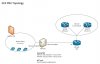
I would like to ask you for help with following issue with RTP packets. We have following topology, external ISP trunk is connected using dedicated line (IP based, without SIP registration) and clients are connected to local network.
9643

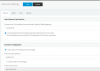
When we select Default Internet facing IP Address to 10.212.17.31. Internet is working, Iphones are happy, but RTP packets from ISP aren’t working.

When we select Default Internet facing IP Address to 10.212.31.34 (link to VoiP ISP), RTPs from ISP start coming, but we have problem access internet from 3CX.
9642

Can you please help me, what will be correct configuration in this topology?
We also asked ISP, if they can change IP based trunk to registered trunk, but it isn’t possible from their side..

Thank you for help,
Jan
 
Look at https://www.3cx.com/blog/docs/network-configurations-supported-3cx-phone-system/

Change 3cx settings to use IP address on the internet

Network card connected to internet add gateway address to the network config.

Network card connected to ISP Voip, setup without a default gateway.

On the 3CX server you need to add a route to push traffic to your VOIP down the correct network card.

If 3CX is running Microsoft, command would be

route -p ADD 172.16.1.0 MASK 255.255.255.0 10.212.31.33

If you then do a tracert to 172.16.1.1, you should see traffic going via 10.212.31.33
 
Last edited:
Look at https://www.3cx.com/blog/docs/network-configurations-supported-3cx-phone-system/

Change 3cx settings to use IP address on the internet

Network card connected to internet change add gateway of address to the network config.

Network card connected to ISP Voip, setup without a default gateway.

On the 3CX server you need to add a route to push traffic to your ISP down the correct network card.

If 3CX is running Microsoft, command would be

route -p ADD 172.16.1.0 MASK 255.255.255.0 10.212.31.33

If you then do a tracert to 172.16.1.1, you should see traffic going via 10.212.31.34

Hello,
thank you for your message. Exactly I have this configuration with static route to VoIP ISP. Default gateway is configured correctly (it's same default gateway like for other clients on network).

Problem is, when I select Default Internet facing IP Address to 10.212.17.31, SIP signalization to ISP trunk is working (then I think system routing is working well), but RTP packets are droped. (I see it on 10.212.31.34 interface, connected to VoIP ISP, using Wireshark - RTPs are comming 172.16.1.17, but 3CX just return ICMP port unreachable error message).

When I changed it default Internet facing IP adddess to 10.212.31.34, RTPs running well.

I don't know, if can't be problem, that trunk isn't registered, just IP based..
Also RTPs are comming from other server, than is SIP registration..
Maybe 3CX waiting, that RTPs will come from default internet facing interface..

What you thing, where can be problem?

Thank you,
Jan
 
Hey Jan,

Could you sent a screenshot of the RTP packets in Wireshark coming from the Provider and the ICMP messages?
 
Also try the following. In settings --> network set the actual public IP that your internet connection has.
the under SIP Trunks --> Options, set the Private ip of the dedicated NIC you have for the provider:
9644

See how that goes
 
Also try the following. In settings --> network set the actual public IP that your internet connection has.
the under SIP Trunks --> Options, set the Private ip of the dedicated NIC you have for the provider:
View attachment 9644

See how that goes
Thank you very much, you have right, thats solved my problem ;). Also in wireshark I see correct IPs.
Thany you for your help,
Jan
 
  • Like
Reactions: NickD_3CX
Status
Not open for further replies.

Forum statistics

Threads
111,914
Messages
589,711
Members
164,783
Latest member
GothamUser