3CX Phone with multiple IPs

Status
Not open for further replies.

Javier Casares

Bronze Partner
Joined
Dec 5, 2009
Messages
102
Reaction score
5
I'm having a recurring problem I can't seem to fix besides reverting to a single IP configuration.
Whenever I set multiple IP addresses (from different networks) on the same Ethernet interface VoIP Phone stops working.
Isn't there a way to set the default interface like in the 3CX assistant to avoid these issues?
Some registry or ini setting?

Thanks in advance.
 
jcasares said:
Whenever I set multiple IP addresses (from different networks) on the same Ethernet interface VoIP Phone stops working.
I think you need to explain this in a bit more detail.
 
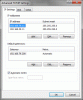
This is what I mean by multiple networks over the same network adapter:


What happens is that the 3CX System can't access anymore the 3CX VoIP Phone and thinks it's disconnected as the server can't access such IP (it is used for testing and the 3CX server doesn't have access to such network but my PC yes). When I check the 3CX server I see this:


The one marked is the registration that the 3CX system keeps but is wrong (the other was the correct one that it should have used). I don't know how the 3CX Phone decides to chose the address to use for registration but that's where the problem seem to reside. It should be selectable someway.
 

Attachments

  • 3cx.gif
    3cx.gif
    23.5 KB · Views: 1,770
  • registered.gif
    registered.gif
    3.2 KB · Views: 1,769
As the majority of devices use only one IP (at a time) the softphone was probably written with that in mind. That's the first request I've seen for that. If multiple IP's are being used on a PC, 3CX software engineers would have to explain how the softphone chooses which one to use to register with to the VoIP provider (or 3CX).
 
You can select your outgoing Interface from the Assistant: File > Preferences > Advanced > Client Interface IP.
 
Can you be more specific?
I can't find no IP setting in last version of 3CX Phone. I was aware of the assistant as I said in my first post but that doesn't help with the phone.

EDIT: you edited your post before I answered. :P
Well, then there is no option in the phone.
 
Yep, i didn't manage to edit it in time :P
We actually removed the ability to choose an outgoing interface in the last few builds of the VoIP Phone.
 
Why was that? It was the feature I need. :(
 
jcasares said:
Why was that? It was the feature I need. :(
Hi

I edited earlier Leo's post, because in the latest versions of the phone there is no external setting for the interface.

This setting has been removed because, in some way, it was a wrong (and leading to troubles) one - and I'm telling this from a 3CXphone's developer's point of view. Since then, 3CXphone should automatically find the proper route to the destination. If this doesn't happen in your case, it means there is a bug which should be fixed and I will ask you for further details to locate it. Basically, we need a dump, from a command prompt, for following
ipconfig /all
route print
netstat -ano
If you don't want to post them here, please send them to me by PM.

Thanks
vali
 
Sent you a PM with the data.

Take in account the first three diagnostics were taken after I added the secondary IP to the network card but without restarting the already running 3CX Phone. The problem happens when I restart it and it's then that it uses the wrong IP to register to the 3CX System. I added the netstat output at the end (it's marked).
 
Status
Not open for further replies.

Forum statistics

Threads
112,332
Messages
591,929
Members
165,486
Latest member
DaanLosning
